

Copy trading setup guide for funded Tradovate traders
TradeDupe
11 min read
Learn how to set up copy trading for funded traders on Tradovate. Streamline your trades, enhance performance, and maintain risk control today!
If you're managing multiple funded accounts on Tradovate, you already know the problem: executing the same trade manually across five, ten, or twenty accounts isn't a workflow, it's a liability. To set up copy trading for funded traders correctly, you need more than a script that mirrors orders. You need a system built around prop firm rules, account-specific sizing, and real-time risk controls. This guide walks you through every layer of that setup, from understanding the mechanics to verifying live performance, with a specific focus on security and scalability inside the Tradovate ecosystem.
Table of Contents
- Understanding copy trading for funded traders
- Preparing your setup: requirements and tools
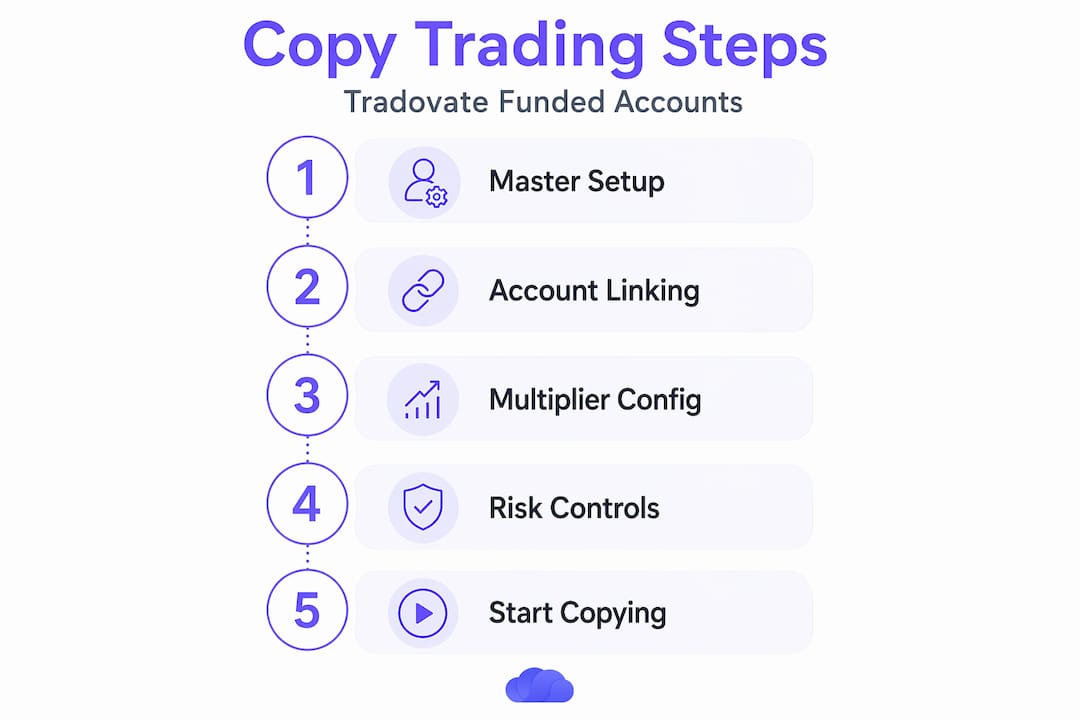
- Step-by-step guide to setting up automated copy trading
- Verifying and optimizing your copy trading performance
- An insider's perspective on copy trading for funded prop firms
- Simplify Tradovate copy trading with TradeDupe's powerful platform
- Frequently asked questions
Key Takeaways
| Point | Details |
|---|---|
| Automate efficiently | Use a SIM master account and reliable trade copier software to streamline trade replication for funded accounts. |
| Tailor exposure | Assign unique multipliers per follower account to scale trade sizes according to each account’s capital. |
| Manage risk | Set per-trade and daily loss limits with automated flattening to protect capital across multiple accounts. |
| Monitor regularly | Regularly review performance and adjust configurations to optimize results and prevent problems. |
| Leverage TradeDupe | Use specialized platforms like TradeDupe for quick, secure setup and robust copy trading on Tradovate. |
Understanding copy trading for funded traders
At its core, copy trading basics means one master account issues an order and every linked follower account mirrors that order automatically, with no manual intervention required. For prop traders, this changes everything. Instead of clicking into each account during a fast-moving ES or NQ session, your entries, exits, and stops propagate across your entire funded portfolio in milliseconds.
What makes copy trading especially powerful for funded account environments is the ability to scale position sizes per follower. A $50,000 Apex account and a $150,000 Topstep account don't need identical contract sizes. Each follower account carries a unique quantity multiplier that adjusts copied trade sizes proportionally, so your risk exposure stays calibrated to each firm's drawdown limits and capital thresholds.
Key reasons funded traders rely on automated copy trading:
- Eliminates manual entry errors that can trigger rule violations across multiple accounts simultaneously
- Reduces execution delays that widen slippage, especially during high-volatility order flow events
- Maintains consistency across accounts, which matters when evaluations are running in parallel with funded live accounts
- Enables scaling without adding operational overhead or hiring additional execution staff
Copy trading replicates trades automatically from master accounts to follower accounts with proportional scaling and risk control. Using a SIM (simulation) master account as the signal source, rather than a live funded account, insulates your follower accounts from broker-specific order ID conflicts and latency irregularities. This is a detail most traders overlook at setup and pay for later.
Now that we understand the fundamentals, next we'll explore what you need to prepare before setting up copy trading.
Preparing your setup: requirements and tools
Before you place a single copied trade, your infrastructure needs to be correct. Missing one element here can cause silent failures, meaning trades that appear to copy but actually fail on the follower side without any visible alert.
Here's what your environment requires:
- NinjaTrader 8 platform installed and connected to your Tradovate account
- A SIM master account configured as the signal source in your copy trading software
- Funded follower accounts on Tradovate or supported brokers (Apex, Tradeify, Topstep, Lucid Trading, Alpha Futures)
- MASCopyADVANCED indicator installed and licensed within NinjaTrader 8
- Defined risk parameters per follower account: max contracts, daily loss limits, and supported order types
MASCopyADVANCED supports any funded account including Tradovate with unique multipliers and includes a 14-day risk-free trial for evaluation. That trial period matters because it gives you time to validate synchronization behavior across brokers before any live capital is at risk.
Key configuration parameters at a glance
| Parameter | What it controls | Recommended starting point |
|---|---|---|
| Quantity multiplier | Scales copied contracts per follower | Proportional to account size ratio |
| Max contracts per order | Hard cap on follower position size | Set to firm's max contract rule |
| Daily loss limit | Auto-stops copying after threshold | Match prop firm drawdown limit |
| Order type | Market vs. limit order routing | Limit orders for higher fill accuracy |
| SIM master toggle | Enables SIM account as signal source | Always ON for multi-broker setups |
For a practical overview of best trade copier technology and how different solutions handle Tradovate's specific API behavior, it's worth reviewing platform comparisons before committing to a configuration.
Pro Tip: Set your multiplier slightly below proportional if a follower account is near its maximum trailing drawdown threshold. A 0.8x multiplier on a tight account preserves headroom during volatile sessions and prevents a single bad trade from triggering a rule breach.
The real-time Tradovate trade copier setup also benefits from having your follower accounts pre-funded and fully activated, not in evaluation mode, before you go live with the copier. Many traders attempt to copy into accounts still in the evaluation phase and hit order rejection issues tied to firm-specific trading rules.
Consider also how your funded futures accounts interact with the copier, particularly when multiple firms impose different tick constraints or instrument restrictions. Document these restrictions before configuring each follower.
With tools and requirements in place, let's walk through the detailed setup process to automate trade copying.
Step-by-step guide to setting up automated copy trading
This process assumes you have NinjaTrader 8 installed, your Tradovate accounts connected, and MASCopyADVANCED licensed and available in your indicator library.
- Download and install MASCopyADVANCED from the MAS Capital marketplace and import it into NinjaTrader 8 via Tools > Import > NinjaScript.
- Open an empty chart in NinjaTrader 8, without any instrument loaded, and apply the MASCopyADVANCED indicator from your indicator list.
- Configure your SIM master account within the indicator settings. Select your designated SIM account as the signal source to avoid live account interference.
- Add each follower funded account one by one, assigning each a unique quantity multiplier that reflects its relative capital size compared to the master.
- Define order routing for each follower. Limit orders deliver higher accuracy in replication because they prevent the copier from chasing fills on fast-moving instruments.
- Set risk controls per account: maximum contract size, daily loss ceiling, and an auto-flatten trigger that closes all positions if a defined loss threshold is hit.
- Activate the copier and place a test trade on the master. Within seconds, verify that all follower accounts show a matching position with the correct size.
- Monitor live charts and follower account dashboards during the first few trading sessions to confirm sync stability before scaling to additional accounts.
Apply MASCopyADVANCED to an empty chart, configure SIM master and follower accounts with multipliers, and start copying trades in seconds. The initial configuration typically takes under 20 minutes for a trader already familiar with NinjaTrader's interface.
Getting started with Tradovate copy trading through a guided walkthrough will also help you avoid the most common setup pitfalls, particularly around broker connection sequencing and account permissions that affect order routing behavior.
Pro Tip: Before going live with real funded accounts, run your first two days in SIM mode across all accounts simultaneously. This stress-tests the copier's synchronization under real market conditions without risking prop firm capital or violating firm-specific rules.
For traders running Apex accounts specifically, the Apex copy trading setup process has a few additional steps around account authentication and order size verification that are worth reviewing in advance.
After setup, it's critical to verify that your copy trading system works flawlessly to ensure security and performance.
Verifying and optimizing your copy trading performance
Setup is a one-time task. Performance verification is ongoing. The traders who lose funded accounts through copy trading almost always trace the failure back to a multiplier they never revisited or a sync error they never caught.
> "The difference between a copy trading system that grows your book and one that blows accounts is how often you review it, not how well you built it initially."
Here are the core checks to build into your weekly review:
- Reconcile follower account positions against the master at the end of every session to catch any missed trades or partial fills
- Check fill quality on follower limit orders to confirm that slippage is within acceptable bounds for your instruments
- Review multiplier accuracy any time a follower account balance changes materially due to profits, withdrawals, or scaling up
- Confirm auto-flatten triggers are still correctly set if firm rules have been updated or account equity has shifted
Monitor on-chart follower accounts and manage risk with automated flattening to maintain control over funded trading environments.
Manual monitoring vs. automated alerts
| Monitoring method | Response time | Accuracy | Scalability |
|---|---|---|---|
| Manual chart review | Minutes to hours | High but labor-intensive | Poor beyond 5 accounts |
| Automated sync alerts | Seconds | High with correct thresholds | Scales to any account count |
| Periodic reconciliation reports | End of session | High for historical review | Scales with reporting tools |
| Automated flattening triggers | Instantaneous | Rule-based, no human error | Full automation possible |
The risk management principles in copy trading clearly favor automation for execution but retain human judgment for strategy-level decisions. You need both layers working together.
Understanding the benefits of multi-account copy trading also means accepting its dependencies. If your master account experiences a connection drop, every follower stops receiving signals. Build a reconnect protocol into your setup so that any outage triggers an immediate alert and a defined fallback procedure.
Having optimized your setup, consider expert perspectives on implementing copy trading effectively in funded environments.
An insider's perspective on copy trading for funded prop firms
Here's something most guides won't tell you: the biggest operational risk in copy trading for funded firms isn't latency or software reliability. It's multiplier drift. Traders set multipliers at launch, then forget them as accounts grow, shrink, or change firms. Six months later, a 1.5x multiplier on an account that's now under a trailing drawdown ceiling becomes the reason that account gets blown on a single correlated event.
The SIM master account approach is underused precisely because it feels counterintuitive. Why run a simulated account as your command center? Because it removes you from broker-specific order ID dependencies. When Tradovate changes API behavior, or when a prop firm adjusts order routing rules, your SIM master stays insulated. The follower accounts absorb the firm-specific rules without contaminating the master signal.
Correlated risk is the other underappreciated exposure. When five follower accounts all copy the same long ES trade at the same time, you're not diversified. You're holding five leveraged positions in the same direction with the same entry. Successful copy trading for multi-account funded desks means diversifying strategies copied across accounts, not just copying one master to every follower. Some accounts copy a momentum strategy, others copy a mean-reversion approach. That separation limits drawdown correlation when market conditions shift.
Involving your risk manager before you set multipliers, not after, is equally important. The trader sees opportunity. The risk manager sees aggregate exposure. You need both perspectives before the first live copy trade is placed. Comparing platforms that handle these workflows differently also helps you understand which tools are built for trading firms versus individual traders copying a single strategy.
Automation is a force multiplier for operational capacity, not a substitute for judgment. The traders who scale successfully treat their copy trading infrastructure the way a systematic fund treats its execution engine: reviewed regularly, documented thoroughly, and never fully trusted without verification.
Simplify Tradovate copy trading with TradeDupe's powerful platform
Managing multiple funded accounts across Apex, Topstep, Tradeify, and other prop firms on Tradovate demands a system built specifically for that environment, not a generic solution adapted to it. TradeDupe delivers real-time trade mirroring with a median latency of 34ms, per-account toggle controls, rogue-trade detection, and auto-recovery, all designed around the funded trading workflow you're already running.
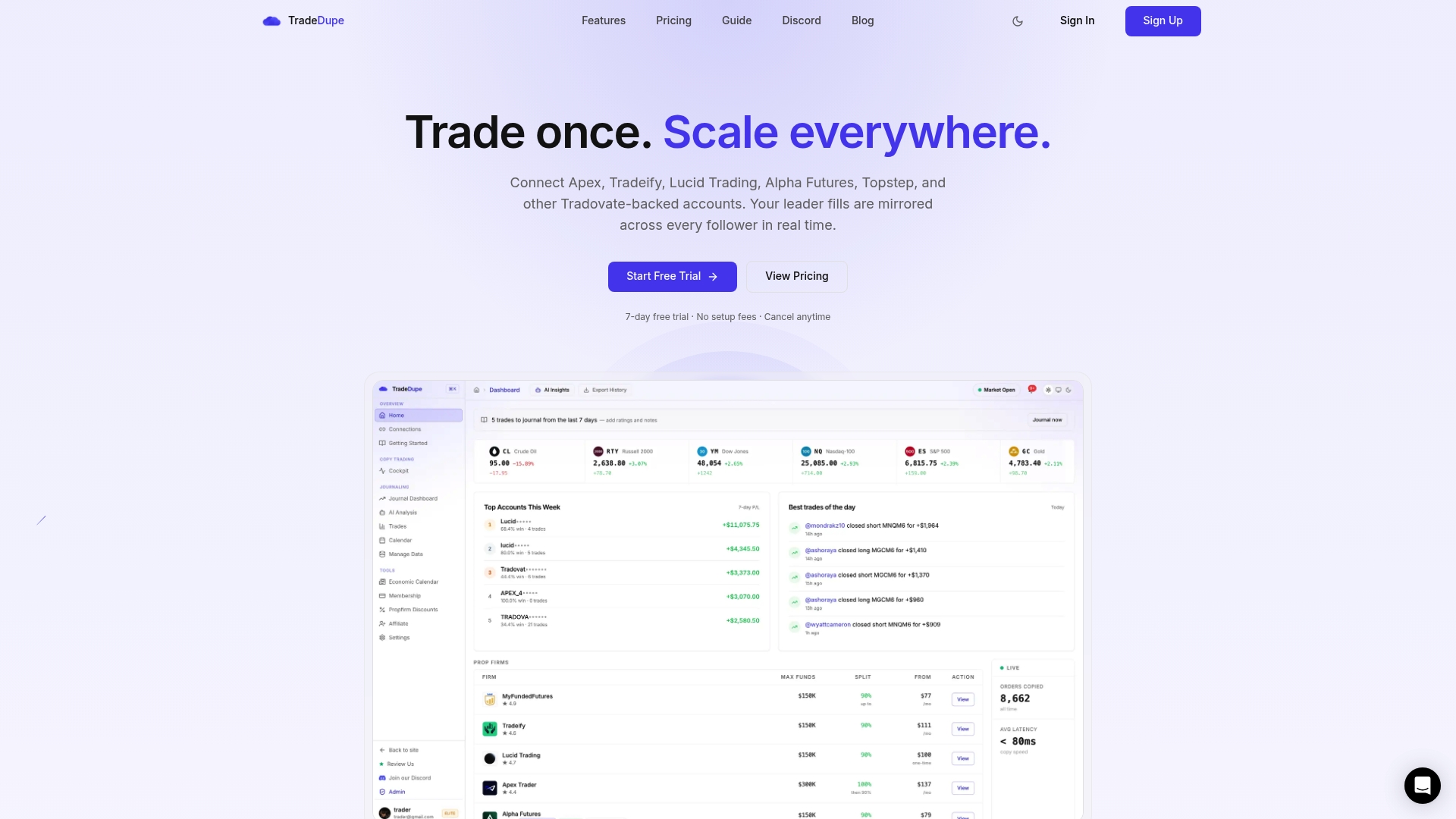
Getting started is straightforward. The TradeDupe platform connects your Tradovate accounts directly, and the quick-start setup guide walks you through configuration in under 10 minutes. Every follower account gets its own multiplier, risk threshold, and monitoring view inside a single dashboard. For a closer look at what the system can do, the full feature overview details the real-time sync architecture, AI-powered trade analysis, and tiered plans built for individual traders through enterprise-level prop desks.
Frequently asked questions
What is the best way to start copy trading multiple funded accounts on Tradovate?
Begin by setting up a SIM master account and configuring software like MASCopyADVANCED to automate trade copying with unique multipliers per account, which ensures secure and accurate replication that respects each firm's capital and drawdown rules.
How can I manage risk effectively when copy trading funded accounts?
Set per-trade contract maximums, daily loss limits, and use automated flattening controls to close positions under stress, and review multipliers and master account performance on a weekly basis to prevent capital mismatches.
Can copy trading on Tradovate be customized per follower account?
Yes, each follower account supports a unique quantity multiplier that scales copied trades proportionally to its capital allocation, giving you precise control over exposure across every funded account in your portfolio.
Is manual monitoring required after setting up automated copy trading?
Automation handles execution reliably, but regular manual reviews of risk parameters, multiplier accuracy, and master strategy performance remain essential to catch configuration drift and adapt to changing market conditions.
How long does it take to set up a Tradovate copy trading system with TradeDupe?
Most traders complete their initial configuration and go live in under 10 minutes using TradeDupe's step-by-step onboarding, which is purpose-built for prop traders and funded account environments on Tradovate.