
Multiple Broker Connections: A Trader's Setup Guide
TradeDupe
13 min read
Learn how to effectively set up multiple broker connections for seamless trading. Explore strategies to maximize performance and efficiency.
Yes, you can run multiple broker connections simultaneously. The three approaches are: a platform multi-broker add-on (one workspace, multiple providers), multiple API/workspace profiles (separate client credentials and ports per broker), and server-side copy or aggregation (a hosted mirror or broker-aggregator that handles replication automatically).
Quick mapping by use case:
- Individual manual trader managing two accounts: multiple API profiles or a platform add-on is usually sufficient.
- Prop desk replicating one leader to many followers: server-side copy trading is the correct architecture.
- Low-latency automated execution across brokers: server-side aggregation with protocol translation, not a desktop multi-instance setup.
Trade-off summary:
- Complexity: API profiles are the simplest; server-side middleware requires the most configuration upfront.
- Latency: Local desktop multi-instance adds round-trip overhead per account; server-side execution typically runs at median latencies well under 100ms.
- Cost: Add-ons and extra API profiles are often low-cost; server-side platforms carry subscription fees that scale with account count.
*
Key Takeaways
Choosing the right multi-broker architecture from the start prevents the most common and costly setup failures.
| Point | Details |
|---|---|
| Pick the right mode first | Add-ons suit 2–3 accounts; server-side copy trading is required at prop-desk scale. |
| Test on demo before going live | Validate market data, fills, and reconnection on paper accounts for each broker before enabling live trading. |
| Watch market-data subscriptions | Each connected account needs its own active data subscription or charting and order entry will fail silently. |
| Enforce per-account limits | Set maximum order sizes and per-account kill-switches to contain execution errors across all connections. |
| Tradedupe for professional replication | Tradedupe delivers low median latency, rogue-trade detection, and auto-recovery for unlimited Tradovate accounts. |
*
Table of Contents
- How do multiple broker connections actually work?
- Platform-specific setup: NinjaTrader, MultiCharts, and MotiveWave
- Pre-connection checklist and troubleshooting for multi-account setups
- What do connection limits, pricing, and setup time look like?
- Security controls and best practices for running multiple broker connections
- How Tradedupe handles unlimited broker connections and multi-account replication
- When should you DIY versus use a managed solution?
- Tradedupe makes multi-account replication production-ready
- Sources
How do multiple broker connections actually work?
The three modes differ at the data-flow level, not just in configuration.
Multi-provider add-on connects two or more brokers inside a single platform workspace. Market data and order routing both pass through the same client session, so one workspace can display charts from Broker A while routing orders to Broker B. The constraint is that each broker's data subscription must be active independently; a missing subscription on one provider blocks charting or order entry for that feed, even if the other provider is healthy.
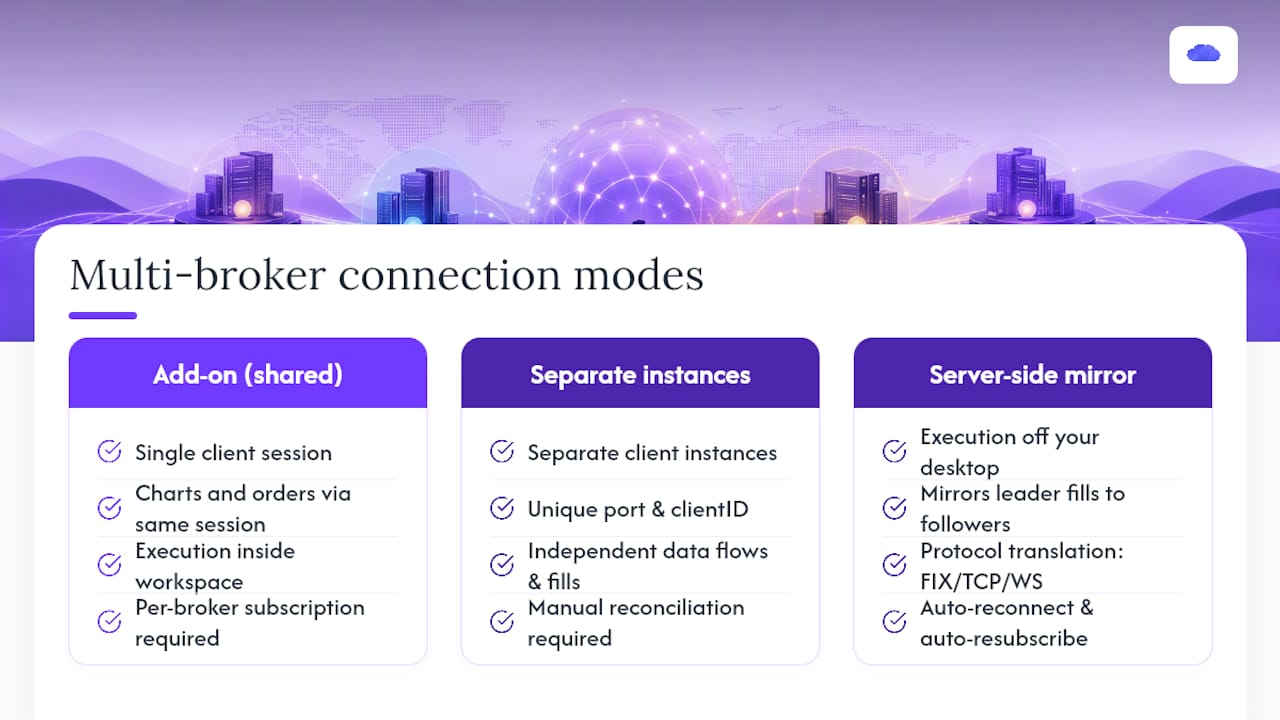
Multiple API/workspace profiles run separate client instances, each authenticated with its own credentials, port, and clientID. Interactive Brokers' TWS is the canonical example: each IB profile needs a unique socket port (default 7496 for live, 7497 for paper) and a distinct clientID to prevent session collisions. Data flows independently per instance, which means fills on Account A do not automatically reconcile with Account B. You handle that reconciliation manually or through a separate aggregation layer.
Server-side aggregation and copy trading moves execution off your desktop entirely. A hosted service receives the leader's fills and mirrors them to follower accounts in near real-time. LiquidityBridge-style middleware connects multiple liquidity providers and trading platforms with no artificial limit on the number of connections, managing each independently with protocol translation (FIX, TCP, WebSocket) and symbol mapping. The execution path is shorter because the mirror logic runs on infrastructure co-located with or close to the broker's matching engine.
The practical difference between local and server-side execution shows up in reconciliation. With local multi-instance, a desktop crash or network drop can leave one account in a position the other has already closed. Server-side solutions typically implement auto-reconnect and auto-resubscribe behavior, as documented in resilience-focused connection libraries like the morkid broker Go library, which exposes a unified Connection interface with built-in reconnect logic.
Pro Tip: Before connecting any live account, run both market-data and order-entry tests on a paper or demo account for at least one full session. Latency and fill reconciliation issues almost never appear until you place a real order under live market conditions.
*
Platform-specific setup: NinjaTrader, MultiCharts, and MotiveWave
NinjaTrader: the Multiple Broker Add-On
NinjaTrader's desktop platform does not support connecting to multiple brokers by default. You need to subscribe to the Multiple Broker Add-On through your NinjaTrader account portal. Once active, the add-on lets you connect a second or third brokerage alongside your primary connection within the same workspace. Supported third-party brokers include Interactive Brokers, Charles Schwab, Forex.com, and FXCM, among others. The add-on is a recurring subscription; check the NinjaTrader account portal for current pricing, as it is listed separately from the platform license.
MultiCharts + Interactive Brokers: port and clientID setup
Connecting multiple IB profiles in MultiCharts requires assigning each profile a unique socket port and clientID. MultiCharts' official documentation walks through this directly. The core steps:
- Open TWS or IB Gateway for the first account and note its socket port (typically 7496 for live).
- Open a second TWS or IB Gateway instance for the second account, configured to a different port (e.g., 7497 or a custom port like 7500).
- In MultiCharts, create a new broker profile for each IB instance, entering the matching port and a unique clientID for each.
- Connect each profile separately and verify market data populates before placing any orders.
- Confirm that each profile shows the correct account number in the order entry panel before going live.
Port conflicts are the most common failure point. If two IB instances share the same port, both connections drop without a clear error message.
MotiveWave: edition requirements
Not all MotiveWave editions support multi-broker workspaces. According to MotiveWave's FAQ, only the Professional and Ultimate editions allow multiple broker and data services within a single workspace. The Standard edition does not. If you are on Standard and need multi-broker access, an edition upgrade is required before any configuration changes will take effect.
Server-side and OAuth-based connectors
Some platforms and aggregators use OAuth or API-key flows to discover accounts automatically. After authenticating, the platform lists all accounts associated with that credential set. You then toggle individual accounts on or off within the platform's account management panel. SheetsFinance's brokerage connections feature, for example, allows importing live holdings from unlimited brokerage accounts, with vendor notes specifically calling out real-time update speeds for Charles Schwab connections.
> Key operational note: Market-data subscriptions are account-level, not platform-level. A broker like Interactive Brokers or Charles Schwab charges data fees per account. Connecting a second account without activating its data subscription will result in delayed or missing quotes on that account's instruments, even if your primary account has full data access.
Pro Tip: Assign each connected account a distinct nickname inside your platform's account manager. A label like "IB-Live-ES" versus "IB-Paper-NQ" prevents accidental order submission to the wrong account during fast market conditions.
*
Pre-connection checklist and troubleshooting for multi-account setups
Pre-connection checklist
Before adding a second or third broker connection, confirm each item:
- Active credentials (username, password, API key) for every account you plan to connect.
- API key scopes set to the minimum required (read + trade; never admin unless the platform requires it).
- Market-data subscriptions active on each account for the instruments you intend to chart or trade.
- Unique socket ports and clientIDs assigned for each IB or API-based connection.
- A paper or demo account available for each broker to test order routing before going live.
- Account IDs noted and matched to the correct broker profile in your platform.
Step-by-step connection testing order
- Connect the first account only and verify market data loads without errors.
- Place a paper order on that account and confirm fill confirmation returns correctly.
- Disconnect, then reconnect to confirm the session restores cleanly.
- Add the second account using its unique port/clientID, and repeat the market-data and paper-order tests.
- Only after both accounts pass individual tests, run them simultaneously and verify fills on one account do not interfere with the other.
Troubleshooting common failures
- Port conflicts (IB/TWS): Two instances sharing port 7496 will both drop. Assign distinct ports and restart both instances after the change.
- API permission blocks: Some brokers require explicit API trading permissions enabled in the account settings portal, separate from the login credentials.
- Two-factor and OAuth flows: OAuth tokens expire. If account discovery stops listing an account, re-authenticate through the broker's OAuth flow rather than re-entering credentials manually.
- Account discovery not listing all accounts: Linked sub-accounts under a master account sometimes require separate API activation per sub-account. Check the broker's account management portal.
- Session limits: Some brokers cap simultaneous API sessions. Exceeding the limit silently drops the oldest session.
Pro Tip: Platform log files are your fastest path to a support resolution. NinjaTrader logs to `Documents\NinjaTrader 8\log`; MultiCharts logs are accessible from the platform's Help menu. Capture the log from the exact time of the failure and include the API response code when submitting a vendor support ticket.
*
What do connection limits, pricing, and setup time look like?
Subscription tiers across multi-broker platforms follow a consistent pattern: entry tiers allow a small number of simultaneous connections, while higher tiers scale to unlimited. Lune's broker connection documentation illustrates this directly: a Starter tier commonly allows a small number of connections, while Ultra and Enterprise tiers offer unlimited connections and higher maximum account counts. Traders planning to scale beyond a moderate number of accounts should design for the next tier from the start rather than migrating mid-operation.
| Mode | Supported brokers | Connection limits | Pricing shape | Setup complexity |
|---|---|---|---|---|
| Platform add-on (e.g., NinjaTrader) | IB, Schwab, Forex.com, FXCM | Add-on unlocks additional connections | Recurring add-on subscription | Low: subscribe, connect in UI |
| Multi-instance API profiles (e.g., MultiCharts + IB) | IB (multiple profiles) | Limited by broker session caps | Platform license + broker fees | Medium: port/clientID config per profile |
| Server-side aggregation/copy trading | Varies by provider; often unlimited | Unlimited (provider-dependent) | Tiered SaaS subscription | High: API keys, auth flows, compliance review |
Time-to-live estimates by setup type:
- Single-platform multi-account (add-on or API profiles): A few hours for a trader already familiar with the platform.
- Multi-platform multi-API with full testing: One to three days, accounting for paper-account validation on each broker.
- Full server-side integration with compliance review: Several weeks, particularly when regulatory reporting or firm-level risk controls are involved.
> Hidden costs to budget for: Market-data fees per account, per-account subscription fees at the broker level, and implementation or support hours if you are integrating a custom API. These costs often exceed the platform subscription itself at scale.
*
Security controls and best practices for running multiple broker connections
Running several live connections simultaneously multiplies the surface area for execution errors and unauthorized activity. The controls below are not optional at scale.
- Use per-account API keys with the minimum required scopes. A key that only needs read and trade access should never have withdrawal or account-management permissions.
- Maintain separate demo accounts for each broker and run any new configuration change on demo before pushing to live.
- Enable per-account toggles so you can disable a single follower account without interrupting the others.
- Implement rogue-trade detection: any order that exceeds a pre-set size threshold or arrives outside market hours should trigger an alert or auto-cancel.
- Schedule permission reviews quarterly. API key scopes and OAuth token permissions drift over time as broker portals update their access models.
On the operational side, set rate limits on order submission per account to prevent runaway loops from doubling into a position. A kill-switch at the account level, not just the platform level, lets you halt one account's activity without touching the others. Reconcile fills against your broker statements after every session; a mismatch between your platform's fill log and the broker's confirmed fills is a signal that a session dropped mid-trade.
For monitoring, track connection health, latency thresholds, and reconciliation mismatches as three separate alert categories. A connection that is technically "up" but showing latency above your threshold is a different problem from a connection that has dropped entirely. Server-side solutions that implement unified connection interfaces with auto-reconnect handle the drop scenario automatically, but latency degradation still requires a human or alerting rule to catch.
Pro Tip: Run a short reconciliation job immediately after market open and again after market close. Desyncs that accumulate during the session are far harder to unwind than those caught within minutes of occurring.
*
How Tradedupe handles unlimited broker connections and multi-account replication
For prop traders running more than a handful of accounts, the DIY multi-instance approach hits a ceiling fast. Tradedupe is built specifically for this scale, operating as a server-side trade copier for futures on Tradovate with a feature set that addresses the operational risks covered above.
Core capabilities:
- Unlimited broker connections across Tradovate-based prop firm accounts (Apex, Tradeify, Lucid Trading, Alpha Futures).
- Rogue-trade detection that flags or blocks orders exceeding configured size thresholds.
- Auto-recovery that restores follower account connections after a session drop without manual intervention.
- Per-account toggle controls so you can pause a single follower without affecting the rest of the group.
- Real-time monitoring dashboard showing sync status, leader and follower activity, and risk metrics in one view.
- AI-powered trade analysis and comprehensive reporting for post-session review.
> Tradedupe's median replication latency is 34ms, measured from leader fill to follower order submission. At that speed, a prop desk running ten follower accounts on Tradovate sees fills land within a single market tick of the leader in most conditions.
A typical prop-desk workflow looks like this: one leader account executes a trade, Tradedupe's server-side engine detects the fill and pushes matching orders to all active follower accounts simultaneously, and the dashboard confirms each follower's fill status within seconds. If a follower account loses its session, auto-recovery reconnects it and resubscribes to the leader's feed without any manual action.
Tradedupe is the right fit when you are managing more than three or four accounts, need real-time monitoring with alerting, or cannot afford the ops overhead of manually reconciling fills across a desktop multi-instance setup. For a single account or a casual two-account setup, a platform add-on or API profile approach is sufficient. The crossover point is scale and risk tolerance.
*
When should you DIY versus use a managed solution?
The DIY path (multi-instance API profiles or a platform add-on) makes sense when you are managing two or three accounts, your broker supports it natively, and you have time to monitor connections manually. The configuration is transparent, the cost is low, and you retain full control over every parameter.
The managed, server-side path becomes the correct choice when three conditions converge: you are running more accounts than you can realistically monitor on a desktop, your strategy requires consistent sub-100ms replication across all followers, and your operation has compliance or audit requirements that demand a log trail beyond what a local platform produces.
Three quick decision checkpoints:
- Account count: More than four or five live accounts makes manual reconciliation impractical.
- Regulatory and compliance needs: Firm-level risk controls and audit trails require infrastructure that a desktop client cannot provide.
- Real-time monitoring and auto-recovery: If a dropped connection during a fast market can cause a meaningful loss, you need auto-recovery, not a manual reconnect.
For traders who have crossed those thresholds, Tradedupe's Tradovate multi-account setup is the purpose-built answer.
*
Tradedupe makes multi-account replication production-ready
The checklist in this guide covers what can go wrong: port conflicts, rogue fills, dropped sessions, and reconciliation gaps. Tradedupe eliminates most of those failure modes by moving execution server-side, where 34ms median latency, auto-recovery, and rogue-trade detection run continuously without requiring your desktop to stay online.

Prop traders on Apex, Tradeify, Lucid Trading, and Alpha Futures can connect their accounts and start mirroring a leader to unlimited followers in minutes. The getting-started walkthrough covers authentication, account linking, and your first live mirror in under ten minutes. For traders evaluating the full feature set before committing, the futures trade copier product page breaks down every tier and what each unlocks. Start your trial and have your first follower account synced before the next session opens.
*
Sources
The vendor docs below are the most direct references for platform-specific configuration steps covered in this guide.
- Docs
- Multiple Broker Add-On
- Connecting Multiple Interactive Brokers (IBKR) Accounts Profiles - Help MultiCharts
- Brokeret
- Pkg
- SheetsFinance — Google Workspace Marketplace
> Save your platform log files before contacting vendor support. Log files capture the exact API response codes and session timestamps that support teams need to diagnose connection failures quickly. Check vendor release notes regularly for newly supported broker integrations and latency improvements.
This article is general information, not a substitute for advice from a qualified financial advisor. Consult a qualified financial professional about your own circumstances before acting on anything here.