
The Best Risk Manager Dashboard for Tradovate Multi-Account Trading
TradeDupe
9 min read
Discover the ultimate risk manager dashboard for Tradovate, designed for seamless multi-account trading and real-time risk control.
TradeDupe is the risk manager dashboard to run if you mirror trades across multiple Tradovate accounts. The reason is simple: it pairs server-side trade mirroring with per-account risk controls, so a leader account's execution reaches every follower without you babysitting terminals. Two numbers back this up: a median latency of 34 milliseconds between leader and follower fills, and native support for the four prop firms most desks actually trade under, Apex, Tradeify, Lucid Trading, and Alpha Futures.
Before you commit a funded account to it, run this quick sequence:
- Start a trial and connect one leader plus one micro-contract follower.
- Watch the sync status panel through a full session for dropped or delayed fills.
- Confirm the audit log captures every order from entry to close before scaling to more accounts.
Key Takeaways
A Tradovate multi-account risk dashboard only works when real-time sync monitoring, per-account controls, and audit logs operate together, not as separate add-ons.
| Point | Details |
|---|---|
| Latency benchmark matters | Look for sync monitoring near TradeDupe's 34ms median leader-to-follower fill gap. |
| Isolation beats blanket controls | Choose per-account freeze and disable toggles over group-wide kill switches alone. |
| Test before scaling | Run a micro-contract smoke test and verify audit logs before connecting funded accounts. |
| Prop-firm rules need native support | Confirm the dashboard understands Apex, Tradeify, Lucid Trading, and Alpha Futures requirements. |
| TradeDupe fits the Tradovate workflow | It combines server-side mirroring, rogue-trade detection, and audit provenance for multi-account desks. |
Table of Contents
- What Makes a Good Risk Manager Dashboard for Tradovate Copy Trading?
- How TradeDupe Delivers Every Required Feature
- How Do You Set Up a Tradovate Risk Dashboard in Under 30 Minutes?
- Running Daily Operations Without Blowing Up an Account
- What Does a Risk Manager Dashboard Cost?
- What I've Learned Watching Multi-Account Desks Operate
- Start Monitoring Your Tradovate Accounts in One Place
- Where to Verify and Troubleshoot Further
- Frequently Asked Questions
- Sources
What Makes a Good Risk Manager Dashboard for Tradovate Copy Trading?
Not every trade copier doubles as a real risk manager dashboard. The difference shows up the moment something breaks, a follower account rejects an order, a leader disconnects mid session, or a prop firm's daily loss rule gets tested. Here's the checklist that actually separates a monitoring toy from an operational tool for a Tradovate desk.
- Real-time sync monitoring: you need live latency readouts between leader and follower fills, not a refresh-and-hope status page. A dashboard should flag drift the moment it happens, ideally under a benchmark like the 34ms median TradeDupe reports.
- Rogue-trade detection and auto-protection: look for automated kill switches, auto-flat triggers, and per-account isolation so one runaway follower doesn't cascade into five blown accounts.
- Per-account control toggles: the ability to freeze, disable, or restrict order types and position sizes on a single account, without touching the rest of the group, is non-negotiable for role-based teams.
- Auto-recovery and failover: server-side execution with retry logic for rejected orders matters more than almost any other feature once you're running eight or more followers.
- Audit logs with full provenance: every trade needs a record of who initiated it, when, and how it moved through the order lifecycle, both for internal review and for prop-firm compliance audits.
- Analytics for P&L and drawdown attribution: funded-account consistency rules live or die on accurate per-account reporting, not aggregate numbers.
- Prop-firm-aware integrations: the dashboard should understand Apex, Tradeify, Lucid Trading, and Alpha Futures rule sets, not just generic Tradovate connectivity.
- Custom alerting: SMS, email, Slack, and webhooks, with escalation paths that route a kill-switch event differently than a routine sync notice.
- Scalability under load: concurrent account handling that doesn't degrade when volume spikes across the group.
Pro Tip: Test rogue-trade detection deliberately, not by accident. Disconnect a follower's API session mid-trade during a demo run and watch how the dashboard responds. If it doesn't isolate that account within seconds, it's not ready for funded capital.
How TradeDupe Delivers Every Required Feature
TradeDupe was built around the exact checklist above, not retrofitted to match it. Server-side execution handles the leader-to-follower mirroring itself, which is the architectural choice that keeps latency low and removes your local machine as a point of failure. Rogue-trade detection and auto-recovery run continuously in the background, flagging exceptions and triggering protective action without a human watching every tick.

| Required Feature | TradeDupe Implementation |
|---|---|
| Real-time sync monitoring | Live dashboard with 34ms median leader-to-follower latency |
| Rogue-trade protection | Automated detection with auto-recovery and isolation |
| Per-account controls | Individual toggles for freeze, disable, and restrict actions |
| Audit trail | Full per-trade provenance logging |
| Prop-firm integrations | Native support for Apex, Tradeify, Lucid Trading, Alpha Futures |
The latency figure deserves its own callout. A 34-millisecond median gap between leader and follower fills means most mirrored trades land at nearly the same price the leader got, which matters enormously when you're managing a funded account's slippage tolerance against a prop firm's consistency rule. Operationally, that's the difference between a copy trade that tracks the leader's intended entry and one that chases price into a worse fill.
TradeDupe's futures trade copier also handles contract-size mapping, so ES-to-MES or NQ-to-MNQ conversions across accounts of different sizes don't require manual math on your end. The standard integration pattern follows a leader-registers-first flow: one account is designated leader, followers authenticate separately, and per-account multipliers control position sizing from there. During a trial, test edge cases specifically, partial fills on the leader, a follower hitting a prop firm's daily loss cap mid-mirror, and a dropped connection during volatile market conditions.
How Do You Set Up a Tradovate Risk Dashboard in Under 30 Minutes?
Getting a multi-account setup live doesn't require a full day. Follow this order and you'll have a validated system before your next session.
- Confirm account access. Verify API keys, permission scopes, and contract mappings (ES to MES, NQ to MNQ) for every account you plan to connect.
- Register the leader account through TradeDupe's desktop authorization flow.
- Add follower accounts one at a time, setting position multipliers and contract caps per account rather than applying a blanket ratio.
- Enable core protections: daily loss caps, auto-liquidation, the kill switch, and reject-resubmit logic for rejected orders.
- Run a smoke test with a single micro contract: place a simulated entry and exit, watch latency in real time, and confirm the audit log records the full lifecycle.
- Verify rejected-order handling by intentionally triggering a margin or size mismatch on one follower.
Pro Tip: Run your first week of live mirroring on micro contracts, even if your funded accounts trade full size. It costs almost nothing and gives you a real stress test of auto-recovery without risking a funded evaluation.
Running Daily Operations Without Blowing Up an Account
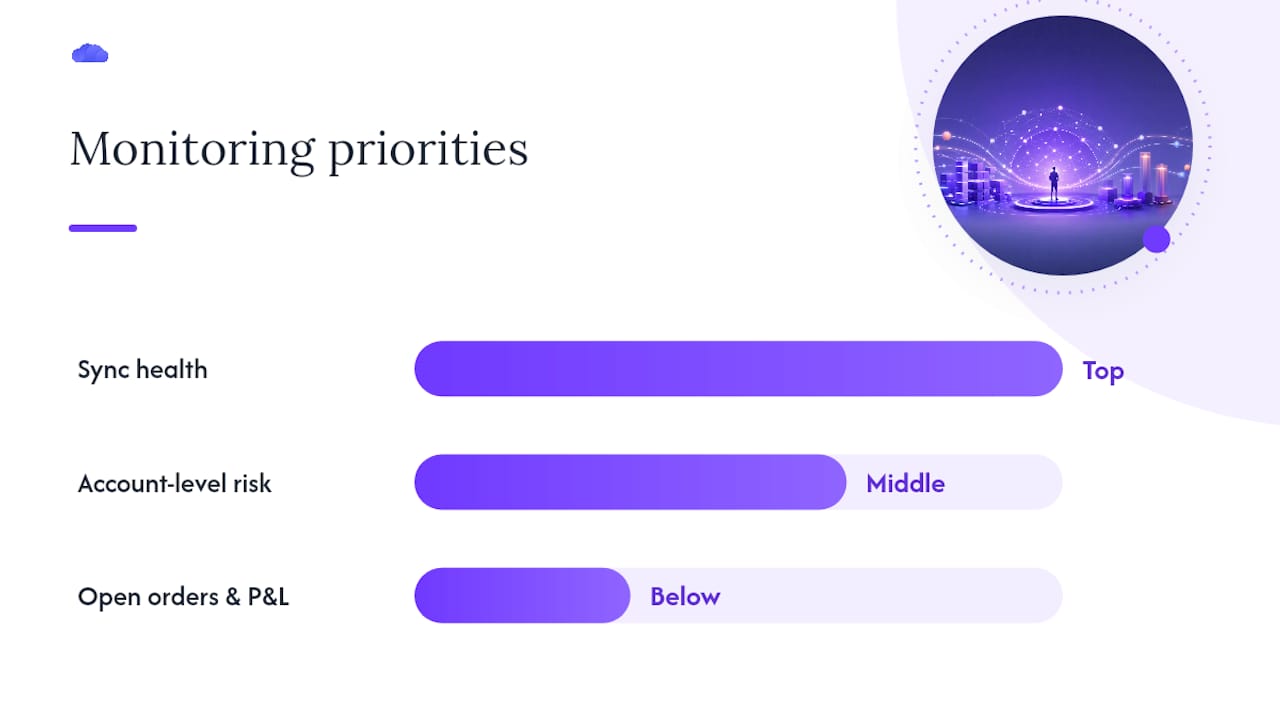
A live monitoring layout that works puts sync health at the top, account-level risk in the middle, and open orders plus a P&L heatmap below. That order matters because sync failures cause more account blowups than bad trades do.
Build an incident response habit around three questions: when do you flatten a position, when do you isolate a single follower instead of the whole group, and when does an issue get escalated past the lead trader to engineering? Document every incident in the audit log, not a separate spreadsheet, so provenance stays intact.
- Run daily pre-trade checks on connectivity and account status before the session opens.
- Schedule weekly rule reviews against each prop firm's current requirements.
- Stress-test the system quarterly under simulated high-volume bursts.
Tune alerts by severity. Route kill-switch events to a dedicated Slack channel for immediate attention; keep routine sync notices in low-priority email so nobody develops alert fatigue and starts ignoring the channel that actually matters. Review permissions regularly and keep kill-switch access limited to the people who need it.
What Does a Risk Manager Dashboard Cost?
Pricing for trade-copier and risk-dashboard platforms typically scales with broker connections and account count, not with trade volume. Expect three common tiers: an individual plan for one to five accounts, a team tier for six to twenty, and custom enterprise pricing above that for larger desks.
- Check whether followers are unlimited within a tier or billed per account, since that changes total cost fast for a twenty-account desk.
- Confirm audit logs and advanced rogue-trade automation are included, not gated behind a top tier, since these features are usually the ones you need most.
- Ask about API access if you plan to build your own alerting or reporting on top of the dashboard.
- Compare monthly versus annual billing, and factor in onboarding time even when a free trial is available.
What I've Learned Watching Multi-Account Desks Operate
Most blowups I've seen trace back to the same root cause: a desk trusted manual monitoring to catch what only automated detection can catch fast enough. A dropped follower connection during a volatile open doesn't wait for someone to notice a stale price feed. The per-account isolation and audit-log discipline covered above aren't optional extras. They're what separates a desk that survives a bad five minutes from one that doesn't.
Start Monitoring Your Tradovate Accounts in One Place
TradeDupe gives a Tradovate desk something a spreadsheet and five open terminals never can: one screen showing sync health, per-account risk, and audit history across every connected account, funded or otherwise.

The platform covers everything this guide walked through, server-side mirroring, rogue-trade detection, per-account toggles, audit logs, and native support for Apex, Tradeify, Lucid Trading, and Alpha Futures accounts. If you're evaluating it, run the same smoke test outlined above during your trial: one micro contract, one follower, full audit-log verification before you scale up. Review the security and reliability details if due diligence is part of your process, then connect your first Tradovate accounts and validate the setup before your next live session.
Where to Verify and Troubleshoot Further
- Review TradeDupe's account setup and security pages directly.
- Read the Tradovate community thread on multi-account copy patterns.
- Check audit-log examples for provenance formatting.
Frequently Asked Questions
What is a risk manager dashboard in copy trading? It's a monitoring and control system that tracks leader-to-follower sync status, enforces per-account risk limits, and logs every mirrored trade across multiple Tradovate accounts in real time.
Does TradeDupe work with all prop firms? TradeDupe supports Apex, Tradeify, Lucid Trading, and Alpha Futures natively, covering the integrations most Tradovate-based prop desks rely on.
How fast is trade mirroring between accounts? TradeDupe reports a median latency of 34 milliseconds between leader and follower fills using server-side execution.
Can I control individual follower accounts separately? Yes. Per-account toggles let you freeze, disable, or restrict order types and position sizes on one account without affecting the rest of the group.
What happens if a follower account rejects an order? A properly configured dashboard applies retry and reject-resubmit logic automatically, then logs the event in the audit trail for review.