
Trade Copier Audit Logs: Verify Every Copied Trade
TradeDupe
17 min read
Discover how trade copier audit logs ensure every trade is verified. Capture essential data to prove each execution accurately.
A complete trade copier audit trail must capture execution evidence, replication metadata, and integrity markers so you can prove, field by field, that every leader trade reached every follower account correctly. Without that coverage, you cannot distinguish a missed fill from a latency spike, or a legitimate partial re-fill from a duplicated execution.
Required fields — your minimum viable audit record:
- Timestamp (UTC/ISO 8601, with timezone offset)
- Leader order ID and leader trade ID
- Follower order ID (one per follower account)
- Instrument/symbol (e.g., NQ, ES, MNQZ4)
- Side (buy, sell, short, cover)
- Requested volume/size and executed quantity
- Requested price and executed/fill price
- Fill status / isSuccess flag
- Broker execution ID (the exchange-level transaction reference)
- Latency / received timestamp (copier-side receipt time)
- Copy process ID / copyTradeId
- User ID / account ID for each follower
- Error code and message (when applicable)
- Hash or checksum (tamper-evidence marker)
Required log types: execution logs, replication/sync logs, error/reject logs, heartbeat/latency logs, and duplicate-detection events. Every production copier should produce all five.
*
Key Takeaways
A complete trade copier audit trail requires execution evidence, replication metadata, and integrity markers to verify every copied trade and detect duplicates before they compound.
| Point | Details |
|---|---|
| Must-have fields | Leader trade ID, broker execution ID, follower order ID, and isSuccess flag are the minimum set to prove a copy executed. |
| Required log types | Produce execution, replication, error/reject, heartbeat, and duplicate-detection logs; keep compliance logs in immutable append-only storage. |
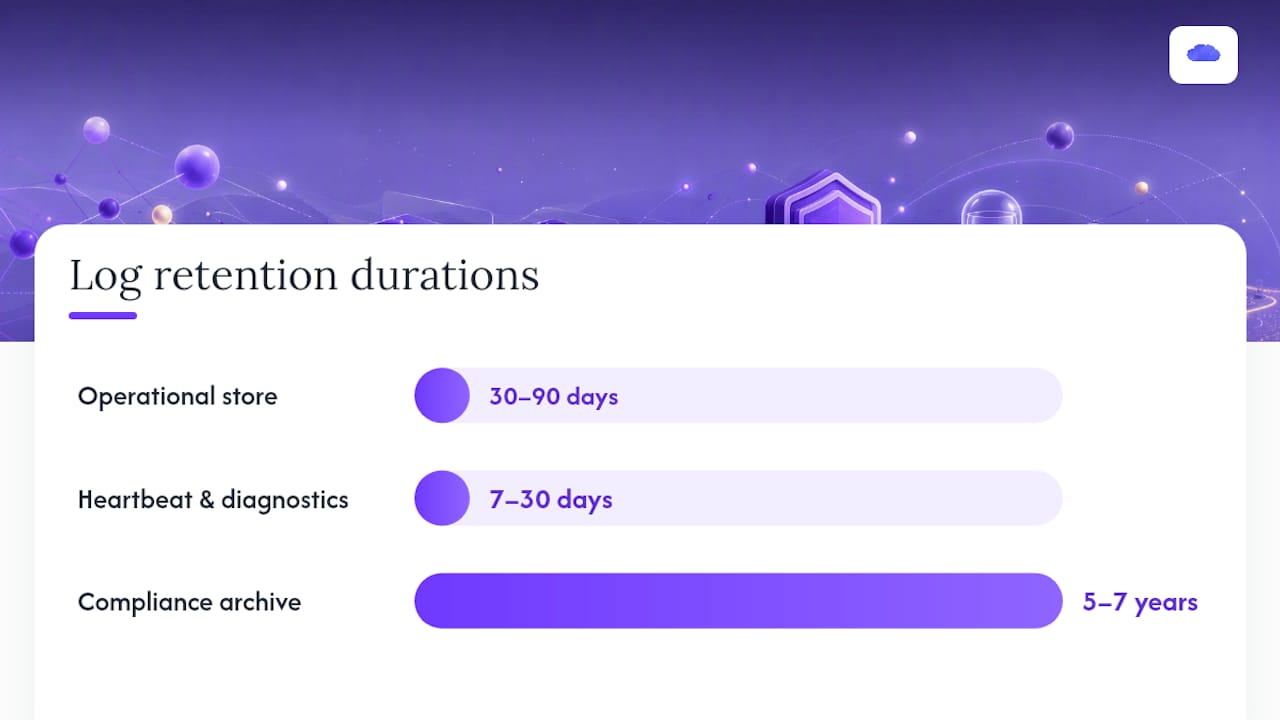
| Export and retention | Use structured JSON via API for automated reconciliation; retain operational logs 30–90 days and compliance archives 5–7 years. |
| Duplicate prevention | Build idempotency keys from leader order ID + copyTradeId + follower account ID; investigate any duplicate-detection trigger cluster immediately. |
| Tradedupe implementation | Tradedupe covers the full field set, including broker execution IDs, isSuccess flags, rogue-trade detection, and exportable audit trails for prop desks on Tradovate. |
*
Table of Contents
- What each audit-log field actually proves about the copy
- How to check trade copier logs and verify a copied trade
- Concrete examples: what audit-log entries look like in CSV and JSON
- Which log types your copier must produce
- Generating, exporting, and retaining logs
- Duplicate-trade prevention and troubleshooting
- Real-time monitoring, alerts, and automated reconciliation
- How Tradedupe implements audit logs in production
- What actually matters most in copier audit logs
- Tradedupe gives prop desks a verifiable audit trail
- Sources
What each audit-log field actually proves about the copy
Datadog's audit-logging baseline identifies five fields every auditor expects: event name, description, timestamp, actor identity, and affected resource. A trade copier audit trail extends that baseline with execution-specific fields that prove the copy happened correctly at the order level.
Here is what each field proves and what its absence or corruption signals:
- Timestamp (UTC): Proves when the event occurred. A missing or inconsistent timezone is the single most common source of reconciliation errors across multi-broker environments. Always store both the broker-reported timestamp and the copier-received timestamp.
- Leader order ID: The anchor for the entire copy chain. Every follower fill, every error, and every retry must reference this ID. If two follower orders share the same leader order ID without a partial-fill explanation, you have a duplicate.
- Leader trade ID: The exchange-confirmed trade reference on the leader side. Proves the leader's order actually executed, not just submitted.
- Follower order ID: One per follower account per copy event. Lets you map exactly which accounts received the trade and which did not.
- Instrument/symbol: Confirms the correct instrument was copied. A mismatch here is a critical error, not a latency issue.
- Side (buy/sell/short/cover): A reversed side is the most operationally dangerous discrepancy. Log it explicitly; never infer it from price direction.
- Requested volume vs. executed quantity: The gap between these two fields reveals partial fills, broker rejections, or scaling logic errors.
- Requested price vs. fill price: Proves slippage. A fill price materially outside the requested price warrants investigation, particularly in fast markets.
- Fill status / isSuccess flag: The binary verdict on whether the copy succeeded. Copin's Activity Logs API surfaces this as `isSuccess` alongside `sourceTxHash` and `copyTradeId`, making programmatic reconciliation straightforward.
- Broker execution ID / tx hash: The exchange-level receipt. This is the only field that proves the broker actually processed the order, independent of the copier's own records.
- Latency / received timestamp: The delta between leader execution and follower receipt. Spikes here indicate network or broker-side delays, not copy logic failures.
- copyTradeId: Links the leader event to all its follower copies in one query. Essential for batch reconciliation.
- Error code/message: Tells you why a copy failed. Without a structured error code, root-cause analysis requires log archaeology.
- Hash/checksum: Proves the log entry has not been modified after the fact. Append-only storage with per-record checksums is the standard for compliance-grade audit trails.
Pro Tip: The minimal subset that proves a trade executed and reached followers is: leader trade ID + broker execution ID + follower order ID + isSuccess. If those four fields align, the copy is verified. Everything else is diagnostic context.
*
How to check trade copier logs and verify a copied trade
You can verify a single copied trade in under five minutes if your copier exposes a searchable log with leader order ID as a primary filter. Here is the workflow ops teams use:
- Locate the leader order ID. Pull it from your leader account's order history or the copier's real-time dashboard. This is your anchor for the entire investigation.
- Search copier logs by leader order ID. Filter the execution or replication log to show all events associated with that ID. Most copier UIs support this directly; API-based exports let you query by `copyTradeId` or leader ID programmatically.
- Confirm leader execution details. Verify the symbol, side, requested volume, fill price, and broker execution ID on the leader side. FXBlue's MT4 Personal Trade Copier logs record each stage of the copy lifecycle, including instruction receipt and broker confirmation, which gives you a timing baseline for the leader side.
- Match follower order IDs and execution details. For each follower account, confirm a corresponding follower order ID exists with a matching symbol, side, and volume. Check the fill price and isSuccess flag.
- Reconcile volumes, prices, and fill status. Any volume discrepancy beyond your scaling ratio, or a fill price outside your slippage tolerance, requires escalation. A missing follower order ID means the copy was never attempted or was silently rejected.
- Investigate errors and mismatches. Pull the error/reject log filtered by the same leader order ID. Check error codes, retry counts, and timestamps to determine whether the failure was transient (network timeout) or structural (account rejection).
- Confirm latency is within threshold. Compare the leader execution timestamp to the follower received timestamp. A latency spike on a single follower usually points to a broker-side delay; a spike across all followers points to the copier itself.
For timestamp discrepancies, normalize everything to UTC before comparing. Broker-reported timestamps often use local exchange time; copier-received timestamps may use server local time. Storing both in ISO 8601 with explicit timezone offsets eliminates ambiguity.
Pro Tip: Keep a triage checklist for high-severity mismatches: (1) reversed side, (2) doubled volume, (3) missing follower fills on all accounts, (4) broker execution ID present on leader but absent on follower. Any of these warrants immediate position review before the next trade fires.
*
Concrete examples: what audit-log entries look like in CSV and JSON
Fields appear differently across export formats, but the canonical column set stays consistent. The table below maps column names to descriptions and example values for both CSV imports and parsing scripts.
| Column | Description | Example Value | Format |
|---|---|---|---|
| `timestamp` | UTC event time | `2026-03-12T14:32:01.412Z` | ISO 8601 |
| `leaderOrderId` | Leader account order reference | `LDR-00482917` | String |
| `leaderTradeId` | Exchange-confirmed leader trade ID | `TRD-88201934` | String |
| `followerOrderId` | Follower account order reference | `FLW-00193847` | String |
| `copyTradeId` | Copier-internal copy event ID | `CPY-20260312-0041` | String |
| `symbol` | Instrument traded | `NQH6` | String |
| `side` | Trade direction | `buy` | Enum |
| `requestedVolume` | Volume sent to follower | `2` | Integer |
| `executedQty` | Volume actually filled | `2` | Integer |
| `requestedPrice` | Price at copy instruction | `19842.50` | Decimal |
| `fillPrice` | Broker-confirmed fill price | `19843.00` | Decimal |
| `isSuccess` | Copy succeeded flag | `true` | Boolean |
| `brokerExecId` | Exchange transaction reference | `APEX-TXN-9928471` | String |
| `latencyMs` | Leader-to-follower latency | `34` | Integer (ms) |
| `errorCode` | Failure code if applicable | `null` | String/null |
| `checksum` | SHA-256 record hash | `a3f9...c12e` | Hex string |
Sample JSON — OPEN trade (leader → follower):
```json { "timestamp": "2026-03-12T14:32:01.412Z", "leaderOrderId": "LDR-00482917", "leaderTradeId": "TRD-88201934", "followerOrderId": "FLW-00193847", "copyTradeId": "CPY-20260312-0041", "symbol": "NQH6", "side": "buy", "requestedVolume": 2, "executedQty": 2, "requestedPrice": 19842.50, "fillPrice": 19843.00, "isSuccess": true, "brokerExecId": "APEX-TXN-9928471", "latencyMs": 34, "errorCode": null, "checksum": "a3f9d8c2...c12e" } ```
Sample CSV row — CLOSE trade:
``` 2026-03-12T15:10:44.019Z,LDR-00482917,TRD-88201935,FLW-00193848,CPY-20260312-0042,NQH6,sell,2,2,19901.25,19901.00,true,APEX-TXN-9928512,31,,b7e2a1f4...d09c ```
Overcharts' Trade Copier Activity Log exports to `.txt` or `.csv` with fields including date, time (PC local time), connection, account, symbol, and message. For production reconciliation, prefer the structured JSON API format over plain-text exports, since it preserves data types and avoids CSV quoting edge cases. Always use ISO 8601 timestamps with explicit UTC offsets, decimal points (not commas) for prices, and quote any string field that may contain a comma.
*
Which log types your copier must produce
Not every log type serves the same purpose. Some are authoritative for compliance; others are diagnostic for ops teams. A production copier should generate all of the following:
- Execution logs: Record the leader's order submission, fill confirmation, and broker execution ID. These are the authoritative source of truth for what the leader account did. Consult these first when a follower reports a discrepancy.
- Replication/sync logs: Record the copier's internal copy event, including copyTradeId, follower account mapping, and the instruction sent to each follower. LinkedIn-documented MetaTrader 5 implementations confirm that a full activity trail covering execution time, symbol, volume, and direction is the minimum transparency standard for MT5 copiers.
- Acceptance/reject logs: Record whether each follower's broker accepted or rejected the copy instruction. A reject log with a structured error code is what separates a diagnosable failure from a silent miss.
- Error/retry logs: Track transient failures, retry attempts, and final outcomes. These are diagnostic, not authoritative, but they are essential for root-cause analysis on intermittent copy failures.
- Duplicate-detection events: Log every instance where the copier identified and suppressed a repeated leader order ID or copyTradeId. These entries prove the deduplication logic fired correctly.
- Heartbeat/latency logs: Record periodic connectivity checks between the copier and each broker connection. A gap in heartbeat entries is often the first indicator of a network partition that caused missed copies.
- Immutable audit logs (compliance-grade): A tamper-evident, append-only record of all the above, with per-record checksums. These are the logs you produce for a compliance review or dispute resolution. Operational logs can be mutable for debugging; compliance logs must not be.
For compliance purposes, execution logs and immutable audit logs carry the most weight. Error and heartbeat logs are primarily for ops triage and should be retained separately with a shorter searchable window.
*
Generating, exporting, and retaining logs
Export format determines how easily you can run automated reconciliation. The three standard options each suit a different use case:
- CSV export: Best for ad-hoc analysis in Excel or Python pandas. Use for one-off investigations or sharing with a compliance officer. Overcharts' `.csv` export is a practical example of this format in production.
- Newline-delimited JSON (NDJSON): Best for streaming into a log aggregation system (Splunk, Datadog, Elasticsearch). Each line is a self-contained JSON object, making it easy to ingest without a schema migration.
- Structured JSON via API: Best for automated reconciliation scripts. Copin's Activity Logs API returns paginated arrays of structured activity objects, including `copyTradeId`, `isSuccess`, `sourceTxHash`, and `createdAt`, which is the format production ops teams should prefer for daily reconciliation.
Retention guidance for prop firms:
- Operational (searchable) store: 30–90 days. This covers the window for most trade disputes and operational investigations.
- Compliance archive: 5–7 years, consistent with FINRA Rule 4511 requirements for broker-dealer books and records. Even if your firm is not a registered broker-dealer, matching this standard protects you in arbitration.
- Heartbeat and diagnostic logs: 7–30 days. These are high-volume and low-compliance value; archive them separately.
Timestamp normalization is non-negotiable for multi-broker environments. Store every timestamp in UTC with an explicit ISO 8601 offset. Preserve the original broker-reported timestamp as a separate field alongside the copier-received timestamp. Never convert broker timestamps to local time before storing. Orca Security's centralized audit-log guidance recommends collecting logs from all sources (cloud providers, applications, APIs) into a single store for analysis, which applies directly to multi-broker copier environments.
Each export batch should include a manifest file listing the record count, time range, and a SHA-256 checksum of the export file itself. This lets you verify the export was not truncated or modified after generation.
Pro Tip: Automate daily exports via API, compute a SHA-256 checksum on each file, and write both to immutable object storage (AWS S3 with Object Lock, or equivalent). This gives you a tamper-evident archive without manual intervention.
*
Duplicate-trade prevention and troubleshooting
Duplicates in a copy system almost always trace back to message re-delivery, race conditions, or retry logic that fires after a timeout without confirming the original instruction was processed. Professional copier implementations address this with deduplication logic and idempotency keys at the instruction level. The audit log is your primary tool for proving whether a duplicate occurred or whether you are looking at a legitimate partial re-fill.
Investigation checklist for a suspected duplicate:
- Identify the leader order ID in question. Pull all log entries associated with that ID. If you see two follower orders with the same leader order ID and neither is flagged as a partial fill, you have a confirmed duplicate.
- Compare follower order IDs and timestamps. Two distinct follower order IDs for the same leader order ID, submitted within milliseconds of each other, indicate a race condition or double-fire event.
- Check isSuccess flags and broker execution IDs. If both follower orders have `isSuccess: true` and distinct broker execution IDs, both filled. You need to net the position immediately.
- Review retry and error logs. A timeout error followed by a retry, where the original instruction actually succeeded, is the most common cause of duplicates. The error log will show the timeout; the execution log will show both fills.
- Check network retransmission events. A heartbeat gap immediately before the duplicate timestamp is strong evidence of a network partition that caused the copier to retry a timed-out instruction.
- Roll back or net positions if required. If both fills are confirmed, close the excess position immediately and document the incident with the full log evidence for your compliance file.
The key distinction between a legitimate partial re-fill and a duplicate: a partial re-fill shows `executedQty` less than `requestedVolume` on the first event, followed by a second event with the remaining quantity. A duplicate shows two events each with `executedQty` equal to `requestedVolume` and the same leader order ID.
Pro Tip: Build idempotency keys into your copier's instruction layer by hashing the leader order ID + copyTradeId + follower account ID. Reject any instruction whose key already exists in the processed-events store. This prevents duplicates at the source rather than requiring post-hoc cleanup.
*
Real-time monitoring, alerts, and automated reconciliation
Monitoring rules should focus on three signals: divergence between leader and follower positions, latency spikes, and failed copy rates. Anything else is noise until those three are clean.
Recommended alert rules:
- Follower count mismatch: Alert when the number of follower fills for a leader trade is less than the expected follower count. This catches silent rejections immediately.
- Latency threshold breach: Alert when copy latency exceeds your operational threshold. Tradedupe's platform operates at a median of 34ms; a sustained spike above 200ms warrants investigation.
- Error-rate spike: Alert when the error rate on copy instructions exceeds a defined percentage within a rolling window (e.g., more than 5% of copies failing in any 15-minute window).
- Duplicate-detection trigger: Alert every time the deduplication logic fires. A single trigger may be benign; a cluster of triggers in a short window indicates a systemic retry problem.
- Reconciliation mismatch: Alert when the price delta between leader fill and follower fill exceeds your slippage tolerance (e.g., more than 2 ticks on NQ).
Automated reconciliation checks to run per trade:
- Exact leader-to-follower symbol and side match (zero tolerance for mismatches).
- Volume checksum: sum of all follower executed quantities must equal leader executed quantity times the scaling ratio.
- Ledger reconciliation: every follower broker execution ID must be unique and present in the broker's own trade confirmation feed.
FXBlue's MT4 copier logs demonstrate that lifecycle-stage logging, covering instruction receipt through broker confirmation, gives ops teams the timing data needed to distinguish a broker-side delay from a copier failure. That distinction determines whether you escalate to the broker or to your own infrastructure team.
For alert prioritization, use three severity tiers: P1 (reversed side or missing fills on all followers, requires immediate position review), P2 (latency spike or partial follower coverage, requires investigation within 15 minutes), and P3 (single-account error or minor slippage, log and review at end of session). Automated triage should route P1 alerts to an on-call channel and suppress P3 alerts during high-volatility windows to avoid noise.
*
How Tradedupe implements audit logs in production
Tradedupe exposes the audit fields, real-time monitoring dashboard, and export tools that prop desks need to run the verification workflow described above. The platform's architecture maps directly to the field requirements in this guide.
Key implementation features:
- Leader/follower ID mapping: Every copy event links a leader account ID to one or more follower account IDs, with a unique copyTradeId per event.
- Broker execution IDs: Tradedupe captures the Tradovate-level execution reference for both leader and follower fills, giving you the exchange-level proof of execution.
- isSuccess flags: Each follower copy event carries a success/failure flag, surfaced in the dashboard and included in log exports.
- Latency metrics: The platform records and displays copy latency per event, with low latency across production accounts, giving you a baseline for anomaly detection.
- Rogue-trade detection: Tradedupe's rogue-trade detection logic flags leader orders that fall outside defined parameters before they propagate to followers, with the detection event logged for audit purposes.
- Per-account toggles: Each follower account can be enabled or disabled independently, with toggle events recorded in the audit log so you can trace exactly when an account was active.
- Export tools: The platform provides exportable audit trails for prop firms covering the canonical field set, suitable for compliance review or automated reconciliation scripts.
- Auto-recovery: When a connection drops, Tradedupe's auto-recovery logic re-establishes the session and logs the gap, so you can account for any trades that may have been missed during the outage.
In a typical ops workflow, the Tradedupe dashboard handles real-time triage (P1 and P2 alerts), scheduled API exports feed the daily reconciliation script, and the immutable audit trail supports incident response and compliance reviews. Prop desks running Apex, Tradeify, Lucid Trading, or Alpha Futures accounts can map each supported integration to the same audit schema, which simplifies cross-account reconciliation.
*
What actually matters most in copier audit logs
Most ops teams spend too much time on latency metrics and not enough on the three fields that actually determine whether a copy is verifiable: the broker execution ID, the isSuccess flag, and the leader order ID linkage. Latency is a performance indicator. Those three fields are proof of execution.
Top operational priorities when auditing a copy system:
- Proof of execution: The broker execution ID is the only field that cannot be fabricated by the copier itself. If it is missing or mismatched, you do not have a verified copy.
- Idempotency: A copier without idempotency keys will eventually produce a duplicate. The audit log is your detection mechanism, but prevention at the instruction layer is the only reliable fix.
- Rapid root-cause visibility: Structured error codes with a consistent taxonomy let you triage a failure in seconds. Free-text error messages require log archaeology. Require structured codes from any vendor you evaluate.
The uncomfortable truth about many copier audit trails is that they are designed for marketing, not verification. A dashboard that shows "all trades copied" without exposing broker execution IDs or structured error codes gives you confidence, not evidence. The difference matters when a follower account disputes a fill or a prop firm audits your trading activity.
*
Tradedupe gives prop desks a verifiable audit trail
Prop desks that need to satisfy the audit-log checklist in this guide without building custom infrastructure have a direct path: Tradedupe's futures trade copier provides real-time mirroring at a median 34ms latency, a live monitoring dashboard, and exportable audit trails that cover the canonical field set described here.

Two features that directly address the verification requirements above:
- Real-time dashboard with per-account status: Leader and follower activity, isSuccess flags, and latency metrics visible in one view, with rogue-trade detection firing before a bad trade reaches followers.
- Exportable audit trail with integrity markers: Structured log exports covering leader/follower ID mapping, broker execution IDs, copyTradeId, and error codes, suitable for compliance review or automated reconciliation.
Ready to verify your copy setup against this checklist? Get started with Tradedupe and see how the platform maps to your audit requirements in a live environment.
*
Sources
These sources contain field definitions, API endpoint specifications, and export examples you can use when building reconciliation scripts or evaluating vendor compliance.
- Trade Copier - Overcharts Help Center
- MT4 Personal Trade Copier user guide — FXBlue
- Activity Logs - Copin API
- What is Audit Logging? - Datadog
- Audit Logs - Orca Security
This article is general information, not a substitute for advice from a qualified financial advisor. Consult a qualified financial professional about your own circumstances before acting on anything here.