Take Profit Trader PRO Account Rules (November 2026)
TradeDupe
12 min read
Every rule that applies once your TakeProfit Trader Test becomes a PRO account: drawdown, buffer, news blackouts, payouts, resets, PRO+ and copying across accounts.
A TakeProfit Trader PRO account follows six rules: no bots or algos, exit before a CME limit up/down, trade at least one day per calendar month, no counter positions, stay inside the trailing drawdown, and be flat around FOMC, NFP and CPI. You also have a buffer to clear before payouts start, and a copy limit that matters if you run several accounts. This guide walks through each rule as published on TakeProfitTrader's help center, checked in November 2026, so you know what changes the day you pass your Test.
Firm rules change. Before you act on any figure below, confirm it on the TakeProfitTrader help center, which is the final word on your plan.
TL;DR
- PRO has six core rules. The two that catch people are the news blackout (flat one minute before, during and one minute after FOMC, NFP and CPI) and the drawdown type, which depends on your plan.
- Your PRO drawdown equals the maximum drawdown from the Test you passed. Payouts at the 80/20 split start once your balance clears a buffer equal to that drawdown.
- A PRO account must trade at least one day per calendar month, and a reset can be done up to three times per account.
- TakeProfit Trader's FAQ says copy trading is allowed on up to 5 PRO accounts. Its policies ban coordinated trading with other users and counter positions, so keep copying strictly among accounts you own.
- Confirm anything you are unsure about with the firm's support before you trade it.
Table of Contents
- What actually changes when you pass the Test
- The six PRO rules, one by one
- Drawdown and daily loss limit by plan
- The buffer, the split and your first payout
- Resets and what ends an account
- Copy trading across your PRO accounts
- Moving from PRO to PRO+
- A practical routine for several PRO accounts
- Perspective: what we see in multi-account PRO trading
- Copying your accounts with TradeDupe
- FAQ
- Sources
What actually changes when you pass the Test
The Test is the evaluation: you hit a profit target, respect the drawdown and meet the minimum trading days. On the Classic plan, for example, the Test has a 50% consistency rule and three minimum trading days, according to the Classic plan specifications. Once you pay the PRO activation and receive a PRO account, the goal shifts from hitting a target to keeping the account alive while you build profit.
The Classic plan lists a $130 PRO activation fee, which is $0 under the NOFEE40 promotion. That page also shows no funded consistency rule, no payout caps and daily payouts from day one. TakeProfit Trader describes the PRO account as simulated, and your withdrawals are paid in real money once the buffer is cleared, per the BestProps rules summary checked against the firm's pages in early November 2026.
The firm now sells three plans, Intraday, Classic and EOD, each in $25K, $50K and $150K sizes. The EOD plan offers end-of-day drawdown from evaluation through funded to live, according to the firm's November 2026 announcement. Which plan you hold decides which version of several rules below applies to you.
The six PRO rules, one by one
These come from the firm's PRO Account Rules page (version dated November 23, 2026).
- No bots or algos. Automated strategies that place trades for you are not allowed. This is the rule people confuse with copying, so see the copy section below.
- Exit before limit up/down. CME futures have daily price limits. If the market is about to hit one, you must be out of all positions before it is reached or you lose the PRO account.
- Trade at least one day per calendar month. An idle PRO account does not stay active. Put a calendar reminder in if you hold several accounts and rotate between them.
- No counter positions. You cannot be long on one account and short the same instrument on another account you own or control.
- Stay within the trailing drawdown. More on this below.
- Be flat around major news. No open positions and no working orders one minute before, during and one minute after the prohibited events.
The news blackout in practice
The prohibited events are FOMC statements and announcements (Wednesdays at 2:00 PM ET, with Fed speakers and FOMC minutes allowed), the monthly NFP jobs report (Fridays at 8:30 AM ET) and CPI. "Flat" includes resting orders: a stop or limit order left in the book counts as an open order, so cancel everything, not only positions.
If you trade several accounts, this is a place where one forgotten follower account can cost you a PRO account. Check each account's positions and working orders before the window opens, and look at the firm's calendar for the exact release times each month.
Approved hours and products
The trading window is 6 PM to 5 PM Eastern, and the firm closes open positions automatically at 4:55 PM ET. Holding overnight is not allowed, and missing a product's or a holiday's earlier close time can result in liquidation, per the Rule 4 page (updated May 2026). Approved products are most futures on CME, CBOT, NYMEX and COMEX.
Drawdown and daily loss limit by plan
Your PRO drawdown equals the maximum drawdown of the Test you passed. What differs is how it is measured.
| Plan | PRO drawdown type | Daily loss limit |
|---|---|---|
| Intraday | Intraday trailing | None listed |
| Classic | Intraday trailing | None |
| Legacy | Intraday trailing | None listed |
| EOD | End-of-day | Yes: $500 / $1,000 / $2,500 on 25K / 50K / 150K |
On Classic, the maximum trailing drawdown is $1,000, $2,000 and $4,500 for the 25K, 50K and 150K sizes, and the PRO daily profit limit is $10,000 (Classic specifications).
Why the intraday trailing drawdown surprises people
In BestProps' words, the intraday trailing drawdown catches most new PRO traders because it is not the rule they passed under. If your Test used an end-of-day drawdown, the PRO version on Intraday or Classic tracks your peak equity during the day, including open profit. A trade that runs $800 in your favor and returns to entry has still moved your drawdown line up.
Two habits help: take partial profits instead of letting a full position round-trip, and trail stops tighter than you did in the Test. Our guide to trailing drawdown explains the mechanics, and the buffer math article shows how the line moves with a worked example.
How the EOD daily loss limit behaves
On the EOD plan the limit is tracked in real time, including realized and unrealized P/L and commissions. When you hit it, positions are closed automatically. There are two outcomes:
- Soft breach: your balance is at or above the starting balance. You resume trading the next day.
- Hard breach: your balance is below the starting balance. The account is breached and needs a reset.
If your balance is already near the starting balance, a loss-limit hit can turn from a pause into a reset, so it pays to know where you stand before the session.
The buffer, the split and your first payout
PRO payouts are governed by a buffer. Per the Profit Split and Withdrawal Rules (November 23, 2026), the buffer equals the account's maximum drawdown. The split is 80/20 in your favor.
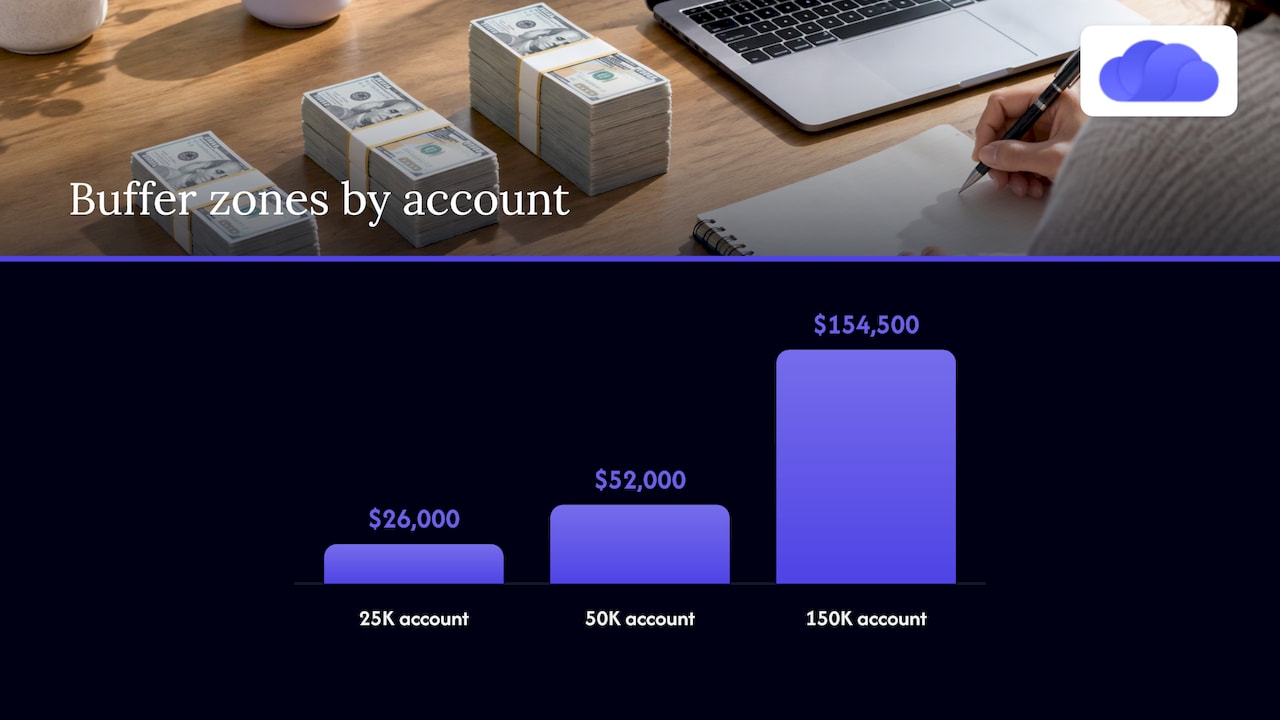
Worked example: a $50,000 account with a $2,000 drawdown needs a $52,000 balance before you can withdraw at 80% of total profit. The buffer zones on current plans are $26,000 on the 25K, $52,000 on the 50K and $154,500 on the 150K.
Withdrawals are possible from day one once the buffer is reached. The Classic page lists no payout caps and no funded consistency rule, and the firm's FAQ says there is no maximum withdrawal amount. If an account closes, 50% of the Buffer Zone can be withdrawn.
A separate point: the same help center states a PRO account's profit split moves to 90/10 in PRO+, covered below. For payout planning across accounts, the prop firm profit calculator helps you estimate what several accounts could return at each split.
Resets and what ends an account
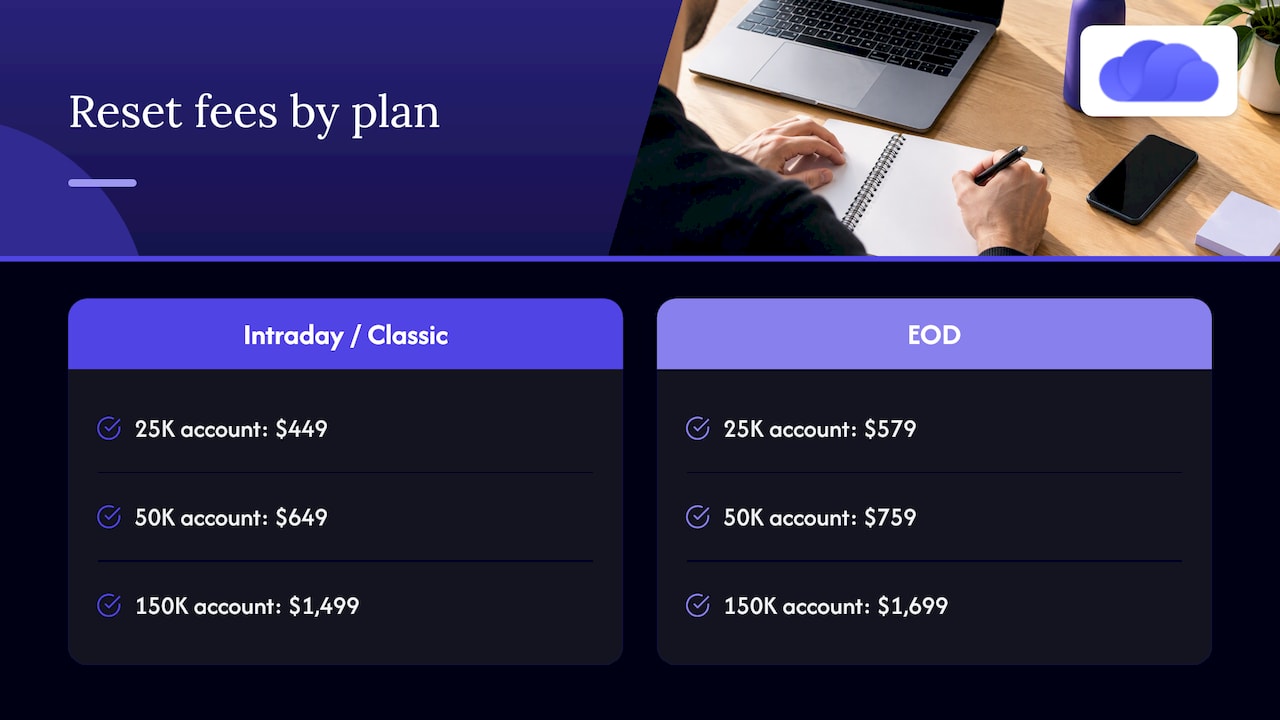
If you breach, the Resetting a PRO Account page says you can reset up to three times per account. The reset price is $449, $649 and $1,499 for 25K, 50K and 150K on Intraday and Classic, and $579, $759 and $1,699 on EOD. The fee is a convenience fee, not capital or margin. If an account's subscription status is disabled, it is closed completely and can no longer be reset.
The firm's Universal Trading Policies (March 2026) list the behaviors that can lead to profit forfeiture, a reset, closure or removal: bots or algos, exceeding maximum position size, breaking CME rules, coordinated trading or third-party account management, counter positions across accounts you control, and trading unapproved products or outside approved hours.
The firm's Sustainable Trading Policy, updated in August 2026, also allows a discretionary review of patterns such as maximum-size trading on most trades, repeated loss-limit breaches and account churning, according to the BestProps summary. Treat it as a reason to size sensibly, not to push every account to its contract cap.
Copy trading across your PRO accounts
This is the question multi-account traders ask first. The firm's official FAQ states that you can trade up to 5 PRO accounts simultaneously, and that copy trading is allowed on up to 5 PRO accounts. It also says there is no consistency rule in PRO. The same document says the 5-account limit carries to live, with up to 5 PRO+ accounts at a 90% split.
Two guardrails sit beside that permission:
- The Universal Trading Policies prohibit coordinated trading with other users and counter positions across accounts you own or control. Copying means every follower mirrors the same direction. Never run a follower on the opposite side.
- Bots and algos are banned. Copying your own manual trades from one of your accounts to your others is a different thing from an automated strategy deciding trades, but wording on firm pages can be updated. If anything about your setup is unclear, ask TakeProfit Trader's support in writing and keep the answer.
The firm also reports at most 10 passed Tests activated in any 30 calendar days, and up to 5 active funded accounts, according to Prop Trading Stat's November 2026 guide. Verify those counts on the help center before you buy several evaluations.
For how the rules interact with mirroring in detail, see our TakeProfit Trader copy trading guide and the full TPT rules overview. If you hold accounts at several firms, the list of futures prop firms that allow copy trading shows where each stands.
Moving from PRO to PRO+
PRO+ is the live-capital stage with a 90/10 split. The PRO+ upgrade page says there is no single threshold: TPT reviews consistency, risk management, execution patterns and discipline as a whole.
When you move up:
- Your PRO account is placed on hold and $5,000 of its profit is frozen while PRO+ is active. Anything above that is withdrawable at the PRO split.
- All future trading and withdrawals happen on the PRO+ account.
- PRO+ starts at $0, with a drawdown equal to your original PRO's starting drawdown, such as -$2,000 for a $50K PRO.
- Drawdown is intraday on Intraday, end-of-day on Classic and Legacy, and end-of-day with a daily loss limit on EOD.
PRO+ Development accounts use reduced sizing: 1/10, 2/20 and 5/50 minis/micros for 25K, 50K and 150K, with a daily loss limit of $500, $1,000 and $2,000 and a smaller trailing drawdown of $750, $1,250 and $2,250, per the Development Accounts page. The firm explains that the real capital at risk is why those guardrails exist.
A practical routine for several PRO accounts
- Write down each account's plan type. Intraday, Classic and EOD behave differently on drawdown and daily loss limits.
- Calculate each buffer. Know the balance each account needs before you can withdraw.
- Set a news checklist. Before FOMC, NFP and CPI, flatten and cancel orders on every account, not only your lead.
- Keep position size inside the contract cap on each size. Classic caps are 3/30, 6/60 and 12/120 minis/micros for 25K, 50K and 150K.
- Log your monthly trading day on each account so none goes inactive.
- Never hold a position past 4:55 PM ET.
Perspective: what we see in multi-account PRO trading
> Most PRO rule problems for multi-account traders come from small operational gaps, not bad trading: a follower account that stayed in a position during a news window, a working order nobody canceled, or a drawdown line nobody was tracking. > > That is why we built TradeDupe only for Tradovate prop traders. You connect through Tradovate's official OAuth, so your password is never stored, and daily loss limits and profit targets are set directly on Tradovate so the broker enforces them. Rogue-trade detection is there to flag follower trades the copier did not place. > > Our view: the discipline the PRO rules demand is easier to keep when your accounts act as one. Confirm each firm's copy policy first, then let the tooling carry the repetitive work. > > Andres
Copying your accounts with TradeDupe
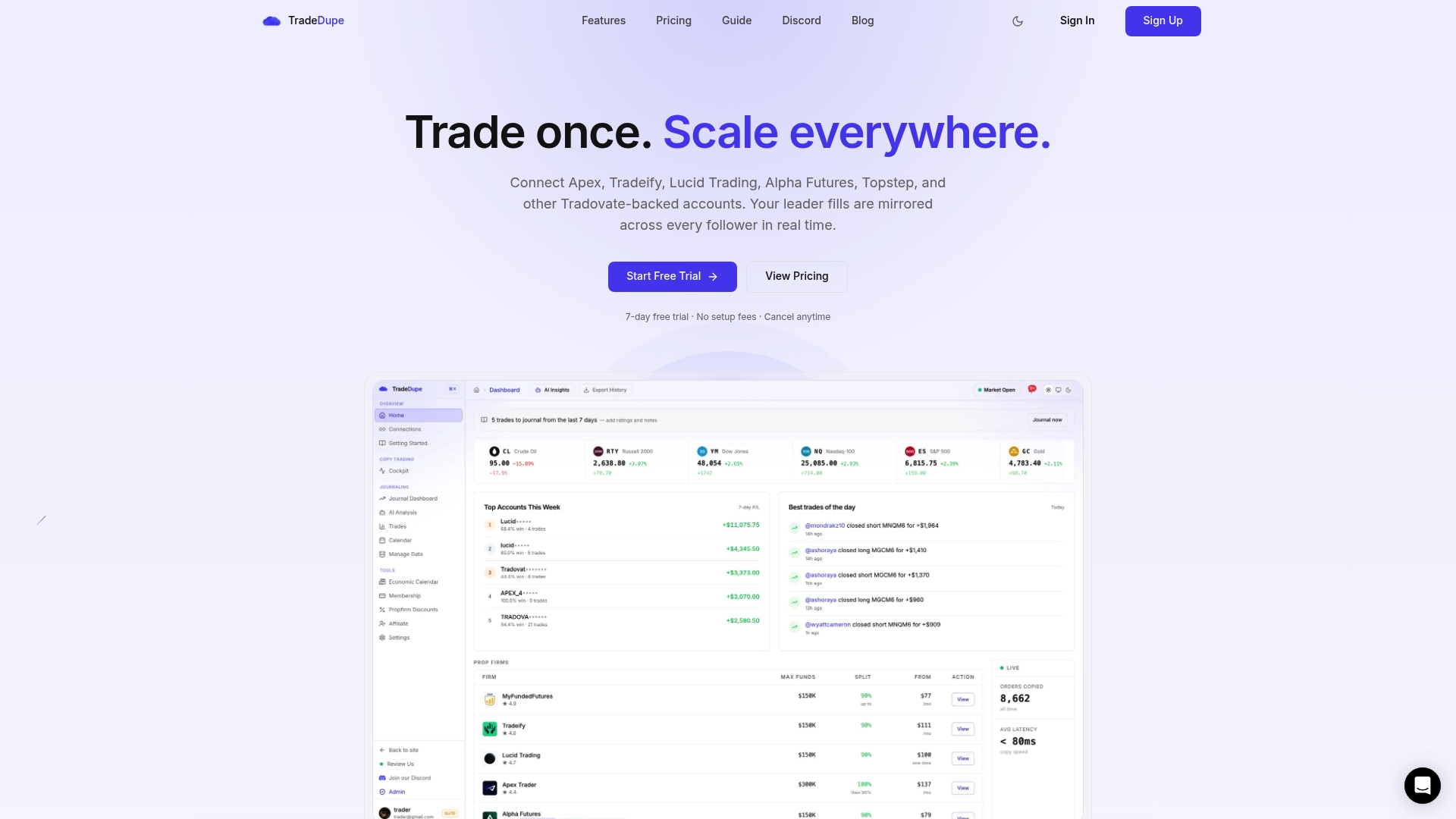
If you hold TakeProfit Trader PRO accounts and want to run them from one leader account, TradeDupe mirrors every fill on your leader to your enabled follower accounts on Tradovate. You can toggle copying per account and set execution modes. Plans start at $20/month billed yearly for Standard, and every plan includes a 7-day free trial with one-click cancellation.
Your firm's copy limits still apply, so check them first.
FAQ
Does a TakeProfit Trader PRO account have a daily loss limit?
Only on the EOD plan, where it is $500, $1,000 and $2,500 for the 25K, 50K and 150K accounts. Classic has no daily loss limit. Confirm which plan your account is on before you size positions.
Can I withdraw right after activating PRO?
Withdrawals are possible from day one, but only after your balance clears the buffer, which equals your maximum drawdown. On a $50,000 account with a $2,000 drawdown, that is a $52,000 balance. After that you keep 80% of profit.
Is there a consistency rule in PRO?
The firm's FAQ and Classic plan page state there is no funded consistency rule. On Classic, the 50% consistency rule applies to the Test only. Check the page for your plan, since rules differ by plan.
How many PRO accounts can I copy?
The firm's FAQ says copy trading is allowed on up to 5 PRO accounts. Keep every account on the same side of the market, since counter positions across accounts you control are prohibited. If your setup is unusual, confirm it with TakeProfit Trader support.
Sources
- PRO Account Rules, TakeProfitTrader help center
- Classic Plan Overview & Specifications, TakeProfitTrader
- Take Profit Trader Funded Account Rules: PRO and PRO+, BestProps
- Take Profit Trader launches end-of-day drawdown, PR Newswire
- Rule 4: Trade Approved Products, During Approved Hours, TakeProfitTrader
- PRO Account Profit Split & Withdrawal Rules, TakeProfitTrader
- Resetting A PRO Account, TakeProfitTrader
- Universal Trading Policies, TakeProfitTrader
- Take Profit Trader FAQs
- Take Profit Trader Rules & Payouts Explained, Prop Trading Stat
- PRO+ Account Upgrade Process, TakeProfitTrader
- PRO+ Development Accounts, TakeProfitTrader
Recommended
- Take Profit Trader Rules 2026: Test, PRO, PRO+ and Copying
- Prop Firm Consistency Rules Compared \(October 2026\): Apex, Lucid, Tradeify, MFFU, Topstep & More
- TakeProfit Trader Copy Trading: Rules and Setup \(2026\)
For educational purposes only. Not financial advice. Futures trading involves substantial risk of loss and is not suitable for every investor.