Order Throttle Limits for Tradovate Copy Trading: Pace Fan Out to Avoid Outages
TradeDupe
10 min read
Operational playbook for Tradovate copy trading: pace fan out, obey p-time/p-ticket retries, debounce stop edits, and use TradeDupe to prevent copier outages.
Order throttle limits are Tradovate's per-second, per-minute, and per-hour request ceilings, and they're deliberately variable rather than fixed. In a copy-trading setup, one leader fill can turn into a dozen follower requests almost instantly, which is exactly how accounts get throttled. The fix isn't complicated: pace your fan-out, and build retry logic that respects the p-time and p-ticket values Tradovate returns. Get that right, and throttling becomes a manageable edge case instead of a recurring outage.
*
> TL;DR: > > - Throttling is most often caused by trailing stops and frequent edits on leader accounts, which multiply request volume across followers and trigger limits. > - Implementing precise retry logic that respects p-time and p-ticket values prevents compounded penalties and reduces outages. > - Using WebSocket streams and debouncing rapid changes can significantly lower request rates and avoid reaching Tradovate's variable request thresholds. > - When throttled, waiting exactly the p-time value and resubmitting with the p-ticket is essential, while p-captcha signals a need for manual intervention rather than retries. > - TradeDupe automates pace management and follower toggling, helping you stay under limits without extensive custom development.
*
Table of Contents
- What Are Tradovate's Order Throttle Limits and How Do They Work?
- Why Copy Trading Multiplies Your Request Volume Fast
- How Do You Design a Copier That Stays Under Throttle Limits?
- What to Do When Your Copier Gets Throttled
- Pre-Launch Checklist Before Scaling Your Copier
- Why Pacing Beats Bursting in Copy Trading Design
- TradeDupe Handles the Pacing So You Don't Have to Build It Yourself
- Official Docs and Example Code Worth Bookmarking
- Sources
- FAQ
What Are Tradovate's Order Throttle Limits and How Do They Work?
Tradovate enforces rolling request windows measured per second, per minute, and per hour, and those thresholds are intentionally variable rather than published as a fixed number. That's a defensive design choice, not an oversight. A static, publicly known ceiling would be trivial to probe and abuse, so Tradovate adjusts thresholds based on load and account behavior.
When you cross a limit, the API responds in one of two ways. A plain 429 status code tells you the request was rejected outright. A time-penalty payload is more specific: it includes a p-time field (seconds to wait) and a p-ticket field (a token you must resubmit with your retry). In rare cases, a p-captcha flag appears, which signals a longer, manual cooldown rather than an automated one.
The practical retry logic looks like this:
- Read the response for a penalty object before assuming a generic failure.
- If p-time and p-ticket are present, wait exactly p-time seconds, then resend the original payload with p-ticket attached, per Tradovate's own retry documentation.
- If p-captcha shows up, stop all automated retries immediately. This isn't a wait-and-retry situation.
- Never mutate the payload between the initial rejection and the p-ticket retry. Tradovate is matching the retry against the original request.
Copiers that skip the p-ticket step and just resend blind requests tend to compound their own penalties.
Why Copy Trading Multiplies Your Request Volume Fast
A single leader order isn't a single request once it hits a copier. It's an order placement, sometimes a modification, sometimes a cancel and replace, multiplied across every follower account. Run 15 follower accounts and one leader stop-loss adjustment becomes 15 modify requests fired in the same window, plus whatever polling or authentication traffic is already running in the background.
Here's where most desks actually get throttled, in rough order of frequency:
- Trailing stops on the leader account. A trailing stop that adjusts every few ticks generates a continuous stream of modify requests. In a fan-out setup, that traffic multiplies across every connected follower, and it's consistently cited as the single biggest cause of copier throttling.
- Frequent manual stop and target edits. Discretionary traders who fine-tune stops tick by tick are, unintentionally, generating the same request storm as an automated trailing stop.
- Authentication and reconnect storms. A dropped WebSocket connection that triggers simultaneous re-auth across a dozen accounts eats into your hourly allowance before a single order even gets placed.
- REST polling instead of streaming. Copiers that poll order or position state on a fixed interval, rather than subscribing to a stream, burn quota on requests that return nothing new most of the time.
Statistic to plan around: implementers commonly design against working targets of roughly 80 requests per minute and 5,000 requests per hour as conservative planning figures, while acknowledging Tradovate can adjust those ceilings without notice. Treat those numbers as a ceiling to stay well under, not a budget to spend.
One advanced wrinkle worth knowing: if multiple accounts run through a shared VPS or a single outbound IP, that concentration can affect how aggressively the platform throttles traffic from that source. Distributing connections or at least being aware of shared-network exposure matters more as account counts scale.
How Do You Design a Copier That Stays Under Throttle Limits?
The goal isn't to eliminate risk. It's to build a system that degrades gracefully instead of triggering a retry storm. A few patterns consistently work.
Build a per-identity governor. Rather than firing all follower requests the instant a leader order fills, stagger them through a queue tied to each account's own request budget. Reserve headroom in that budget for emergency actions like a flatten command, so a busy trading period never locks you out of your own exit.
- Queue and pace fan-out instead of bursting all followers simultaneously.
- Subscribe to WebSocket streams for order and position state; avoid REST polling entirely where a stream is available.
- Debounce stop and target modifications so multiple ticks collapse into one request instead of firing on every price change.
- Consider market execution on followers instead of stop and limit orders when latency tolerance allows it, since it cuts the modify traffic those order types generate.
- Make every retry idempotent, keyed to a request ID plus the returned p-ticket, so a delayed response never causes a double fill.
Pro Tip: Debouncing isn't just a performance trick. A trailing stop that updates every tick can single-handedly exhaust an hourly allowance for an entire follower group, so collapsing rapid edits into one request per meaningful price move often does more to prevent throttling than any other single change.
Backoff logic should always respect the server's p-time value rather than an internal fixed delay. Guessing at a wait interval is how retry storms happen.
What to Do When Your Copier Gets Throttled
A throttle penalty is recoverable if your system reacts in the right order. Panic retries make it worse.
- Detect the penalty immediately. Check every response for a 429 status or a payload carrying p-ticket and p-time. Pause all retry activity for that account the moment either appears.
- Wait the full p-time interval. Not an estimate, not a rounded-down guess. Use the exact value returned, then resend the original request with p-ticket attached and nothing else changed.
- Treat p-captcha as a hard stop. If that flag appears, don't script a workaround. Wait roughly an hour and attempt a single manual re-authentication rather than looping automated attempts.
- Escalate if the lockout persists. If a cooldown doesn't clear as expected, contact Tradovate Support for a manual limit reset, and have your account ID, timestamps, and the exact penalty payloads ready.
- Log the incident and set a circuit breaker. Track penalty frequency per account. If a single account trips the throttle more than once or twice in a session, that's a signal to pause its copier feed automatically rather than let it keep retrying into the same wall.
Good reconciliation and alerting practices make this playbook far easier to run consistently, especially across a desk with dozens of accounts moving at once.
Pre-Launch Checklist Before Scaling Your Copier
Before you push a new copier strategy live across more accounts, run through this list.
- Calculate expected request volume from your fan-out math (leader actions times follower count times average modifications per trade).
- Test penalty scenarios in a demo environment and confirm your system correctly parses p-ticket and p-time before it ever touches a live account.
- Set alerts on 429 frequency and penalty rate per account, with a circuit breaker that pauses a noisy copier automatically.
- Limit trailing stop usage on leader accounts, or convert them to debounced periodic updates.
- Stagger reconnect attempts after any disruption instead of reconnecting every account simultaneously.
- Document a manual emergency flatten procedure that works even if the API is mid-penalty.
| Risk factor | Operational fix |
|---|---|
| Trailing stops on leader | Debounce updates or avoid on high-follower-count leaders |
| Simultaneous reconnects | Stagger reconnect timing across accounts |
| REST polling for state | Switch to WebSocket subscriptions |
| No penalty handling | Implement p-ticket/p-time retry logic before going live |
Why Pacing Beats Bursting in Copy Trading Design
Naive copiers treat every follower account as an independent, parallel task, firing requests the instant a leader trade executes. That approach looks fast in a demo and falls apart under real trading volume, because Tradovate's variable limits don't care how urgent your logic thinks the request is.
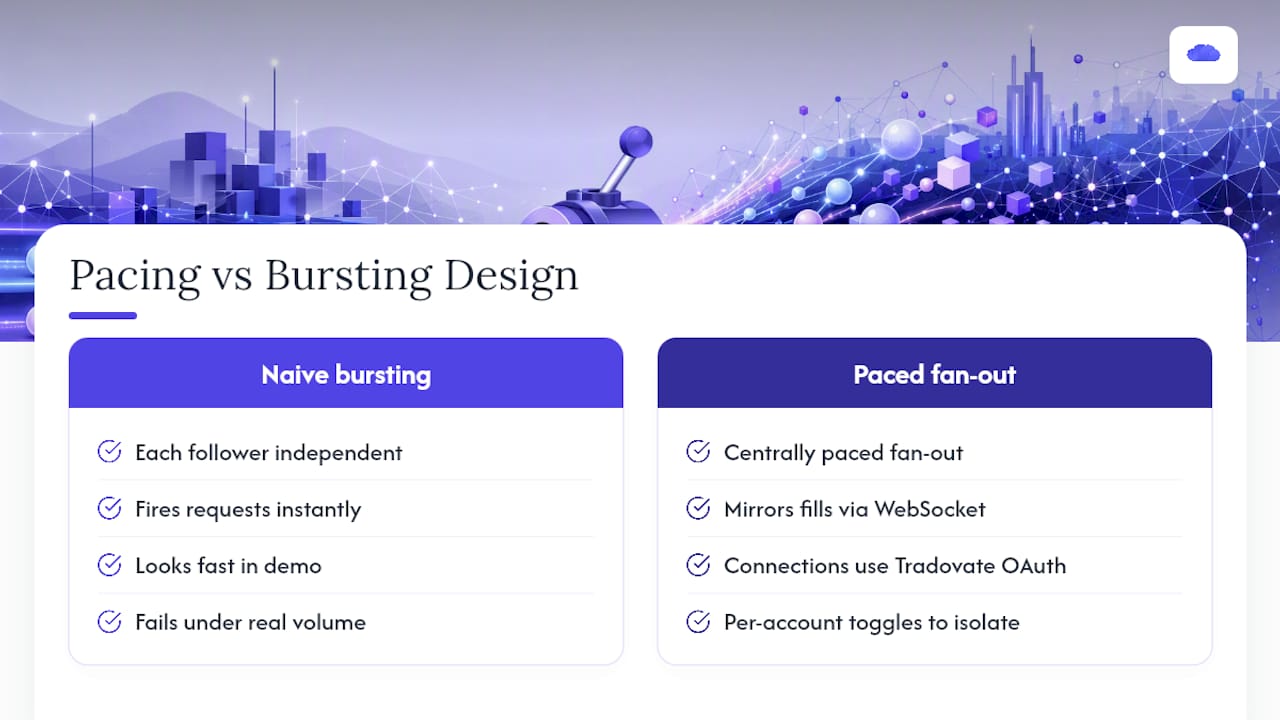
TradeDupe was built around the opposite assumption: fan-out has to be paced centrally, not left to each follower connection to figure out independently. Every fill on the leader account mirrors to enabled followers over live WebSocket streams, connections run through Tradovate's own OAuth flow, and per-account toggles let a desk pull one noisy or misbehaving follower out of the mirror without touching the rest. Rogue-trade detection catches follower activity the copier didn't originate, which matters more once you're managing enough accounts that a single API hiccup could otherwise cascade.
Reserving headroom for emergency actions, rather than spending every available request on routine fan-out, is the difference between a copier that degrades gracefully under load and one that locks a desk out of its own flatten command at the worst moment.
> — Andres
TradeDupe Handles the Pacing So You Don't Have to Build It Yourself
TradeDupe is the alternative to hand-rolling your own governor logic for Tradovate copy trading: rate-limit-aware routing, per-account toggles, and OAuth-based connections come built in, so your desk isn't the one debugging p-ticket retries at 2 a.m.

Every fill on your leader account mirrors to enabled followers over live WebSocket streams rather than REST polling, which keeps request volume down before it ever gets near a throttle ceiling. Per-account toggles mean a single misbehaving follower can be pulled out of the mirror instantly without pausing the rest of your desk. Worth being direct about one thing: TradeDupe can't change Tradovate's throttle thresholds, no product can. What it does is reduce how often you hit them, and handle recovery automatically when you do.
TradeDupe offers tiered subscription plans with a free trial and easy cancellation; current prices are available on their pricing page. If you're ready to see the pacing in action, walk through getting started with TradeDupe and have your first copier configured in about ten minutes.
Official Docs and Example Code Worth Bookmarking
For the authoritative source on how limits and penalties actually behave, read Tradovate's rate-limit documentation directly, along with the example API FAQ on GitHub, which walks through p-ticket and p-time handling with sample code. Test your retry logic in a demo environment before it ever touches a funded account, and keep Tradovate Support's contact details on hand for the rare case a cooldown doesn't clear on its own.
Sources
FAQ
What Causes a Tradovate Order Throttle Limit to Trigger?
Exceeding the per-second, per-minute, or per-hour request ceiling on an account triggers a throttle response, most often from trailing stops, frequent modifications, or reconnect storms across a copier's follower accounts.
How Long Do I Have to Wait After a Throttle Penalty?
Wait exactly the number of seconds specified in the returned p-time field, then resend the original request with the p-ticket value attached rather than guessing at a delay.
What Does p-captcha Mean in a Tradovate Response?
A p-captcha flag signals a longer, non-automated cooldown; stop all scripted retries and wait roughly an hour before a single manual re-authentication attempt.
Can TradeDupe Prevent Throttle Limits Entirely?
No tool can change Tradovate's own thresholds, but TradeDupe reduces the risk by mirroring through WebSocket streams instead of polling and by giving each follower account its own toggle to limit unnecessary traffic.
What Should I Do if Throttling Doesn't Clear on Its Own?
Contact Tradovate Support with your account ID, timestamps, and the exact penalty payload for a manual reset if a cooldown extends beyond what p-time indicated.
Recommended
- Protect Prop Desk Capital With 34ms Tradovate Selective Copy Trading
- Prop Desks: Pause Copy Trading on Tradovate Without Killing Your VPS
- Tradovate Trade Copier | Real-Time Account Sync
- Tradovate Copy Trading: Pro Setups for Multi-Account Traders
For educational purposes only. Not financial advice. Futures trading involves substantial risk of loss and is not suitable for every investor.