Prevent Drift with 100ms Sync Monitoring for Tradovate Prop Accounts
TradeDupe
10 min read
Practical operations guide for Tradovate prop firm traders: set up 100ms sync monitoring, choose order or execution mode, and test on demo.
Yes, server-side, real-time copy trading across multiple Tradovate prop accounts is not only possible, it's how most serious multi-account traders now operate. Cloud copiers that connect through Tradovate's OAuth flow mirror trades to every enrolled follower account, using execution mode for manual fills and signal mode for webhook-driven strategies. A capable platform like TradeDupe claims mirroring around 100 milliseconds, with broker-enforced safeguards baked into every connected account.
*
> TL;DR: > > - Order mode is ideal for strategies that rely on precise order types and bracket structures, while execution mode suits manual trades and fills but sacrifices order fidelity. > - Cloud copiers like TradeDupe mirror trades within approximately 100 milliseconds and include safeguards such as rogue-trade detection and daily loss limits enforced by Tradovate. > - Proper setup involves linking each account via OAuth, selecting a leader account, configuring sizing and rules, and thoroughly testing on demo before scaling live. > - Continuous monitoring with daily logs, latency checks, and drift alerts is essential to prevent cumulative discrepancies across multiple funded accounts over time. > - Choosing between modes depends on your trading style, and well-designed systems avoid blindly auto-retrying, focusing instead on alerting and disciplined management.
*
Table of Contents
- What Multi-Account Sync Monitoring Actually Solves
- Order Mode vs Execution Mode: Which One Fits Your Setup?
- What Your Copier Needs Before You Trust It With Real Money
- How to Set Up Server-Side Sync Across Your Tradovate Accounts
- Keeping Sync Performance Reliable Once You're Live
- What Most Guides Get Wrong About Multi-Account Copying
- Try TradeDupe for Tradovate Multi-Account Sync
- Sources
- FAQ
What Multi-Account Sync Monitoring Actually Solves
Tradovate has no native way to group separate prop-firm identities under one execution engine. That's the root problem every multi-account trader eventually runs into. You can pass three evaluations, get funded on two, and still be stuck clicking the same trade into three different account windows, hoping your fingers move fast enough that the fills don't drift apart. That's exactly why the trading community leans so heavily on a leader/master execution model run through an external copier instead of Tradovate itself.
Sync monitoring trading earns its place in a desk's workflow in a few specific scenarios:
- Multi-eval scaling. Running four or five funded accounts under one strategy means one leader execution, synchronized position sizing, and no manual re-entry per account.
- TradingView-driven automation. A strategy alert fires, the leader executes, and the server-side copier fans that trade out to every follower without a human touching a mouse.
- Bracket and order propagation. Stop-loss and take-profit orders travel with the trade instead of getting rebuilt by hand on each account.
- Centralized risk enforcement. One dashboard, one set of rules, instead of five separate accounts each drifting from the plan in its own way.
The operational payoff is consistency: every account fires at the same moment, at the same size, with the same bracket structure. That's the entire point of monitoring trading performance across accounts rather than eyeballing five terminals at once.
Order Mode vs Execution Mode: Which One Fits Your Setup?
The single most consequential setup decision in Tradovate trading synchronization tools is choosing between order/signal mode and execution/fill mode, because each preserves different information and fails differently under stress.
Order/signal mode is webhook-driven. It preserves order types, limit prices, and bracket structure exactly as they were sent, which makes it the right choice when a strategy alert (say, from TradingView) drives every entry and exit. Nothing gets guessed. If the signal says limit order with a bracket attached, that's what every follower receives.
Execution/fill mode takes a different approach. It watches the leader account at the broker level and replicates whatever actually filled, copying that fill to followers as a market order. This mode is what captures manual discretionary trades and Tradovate's Automated Trading Machine (ATM) strategy fills, but it does not preserve order-type fidelity. A limit order that filled on the leader becomes a market order on the follower.
- Choose order mode when bracket integrity matters more than catching every discretionary click.
- Choose execution mode when you trade manually inside Tradovate and need every fill mirrored, not just the ones sent through webhooks.
Latency and real-time PnL aggregation depend heavily on architecture. Cloud-based WebSocket copiers that avoid local VPS hops report execution times in the sub-50ms to roughly 30ms range in trader forum comparisons, while traders running clunkier local setups report slippage stacking into the hundreds of dollars across large account groups.
If the copier drops offline briefly, behavior matters more than uptime percentage. Well-built systems run a bounded catch-up on reconnect rather than blindly replaying every stale signal, and drift corrections are rate-limited so a follower that's fallen behind doesn't get flooded with delayed orders trying to catch up all at once.
What Your Copier Needs Before You Trust It With Real Money
Not every trade copier deserves a spot in your stack. Before connecting a single funded account, confirm the platform meets these baseline requirements.
- OAuth-based broker linking. The copier should connect through Tradovate's official authorization flow, never by asking for your login credentials directly. Password-based connections are a security liability that a properly built platform simply doesn't need.
- Granular per-account controls. Look for individual copy toggles, fixed-quantity or ratio-based sizing, symbol replacement (useful when accounts trade different micro or mini contracts), and hard caps on maximum contracts per follower.
- Rogue-trade detection. The system should flag any follower trade that didn't originate from the leader, catching mistaken manual entries before they compound into a real problem.
- Broker-enforced daily loss limits. Risk rules set directly on Tradovate, not just inside the copier's dashboard, mean the broker itself is the backstop if something goes wrong upstream.
- A real copy log and audit trail. Every mirrored trade needs a timestamp, an order ID, and a status you can hand to support if a fill looks wrong.
- Alerting through webhooks or Discord. You want to know about a sync failure in the next thirty seconds, not when you happen to glance at a dashboard an hour later.
Pro Tip: Test your rogue-trade detection deliberately once, on demo, by placing a manual trade on a follower account outside the copier. If the system doesn't flag it immediately, that's a red flag worth resolving before you scale to live funded accounts.
How to Set Up Server-Side Sync Across Your Tradovate Accounts
Getting a copier running correctly takes about ten minutes of setup and a lot more patience during testing. Here's the sequence that avoids expensive surprises.
- Link every Tradovate identity separately. Live and demo are treated as separate environments, and each firm-issued login needs its own OAuth authorization before the copier can see it.
- Choose your leader account. This is the account whose trades everything else mirrors, whether that's your own live account or a demo you use purely for signal generation.
- Group your followers and pick a mode. Decide order/signal versus execution/fill based on whether your strategy fires through webhooks or gets placed manually inside Tradovate.
- Set sizing and symbol rules. Configure fixed quantities or ratios per follower, map symbol replacements if accounts trade different contract sizes, and enable stealth mode if you don't want brokers seeing obvious copy patterns.
- Wire in TradingView alerts if you're running signal mode. A TradingView webhook integration routes strategy alerts straight into the leader account for automated execution.
- Run the test sequence. Start on demo, move to your smallest live eval, confirm every trade appears correctly in the copy log, then scale up gradually.
Skipping step six is the single most common mistake traders make with automated trading monitoring setups. A copier that looks perfect on paper can still misfire on real market data, and funded accounts are the wrong place to discover that.
Keeping Sync Performance Reliable Once You're Live
Setup is the easy part. Running effective trade tracking methods over weeks and months, across five or ten funded accounts, is where discipline actually gets tested.
Ramp up deliberately: demo first, then your smallest or least valuable live account, then a review period where you actually read the copy logs before adding anything else.
- Review the copy log daily, not weekly. A missed fill you catch in five minutes costs nothing. One you catch after three days can wipe out a week of gains on a follower account.
- Set alert thresholds for PnL divergence between leader and followers. Even a few dollars of consistent drift signals a sizing or symbol-mapping problem worth fixing.
- Watch latency dashboards where available. A sudden jump from 100ms mirroring to several seconds usually means a connection issue, not a market condition.
- Know your recovery playbook before you need it: pause the copier, reconcile every open position by hand, and pull the order IDs for any trade that looks wrong before contacting support.
Pro Tip: Keep a simple weekly log of every rejected or delayed fill, even the small ones. Patterns that look random day to day, like the same follower account lagging repeatedly, usually point to a specific broker rejection or contract limit worth investigating.
Periodic audits matter too. Rotate access credentials occasionally, confirm broker-level drawdown enforcement is still active on every account, and don't assume a setup that worked in January is still configured correctly in June.
What Most Guides Get Wrong About Multi-Account Copying
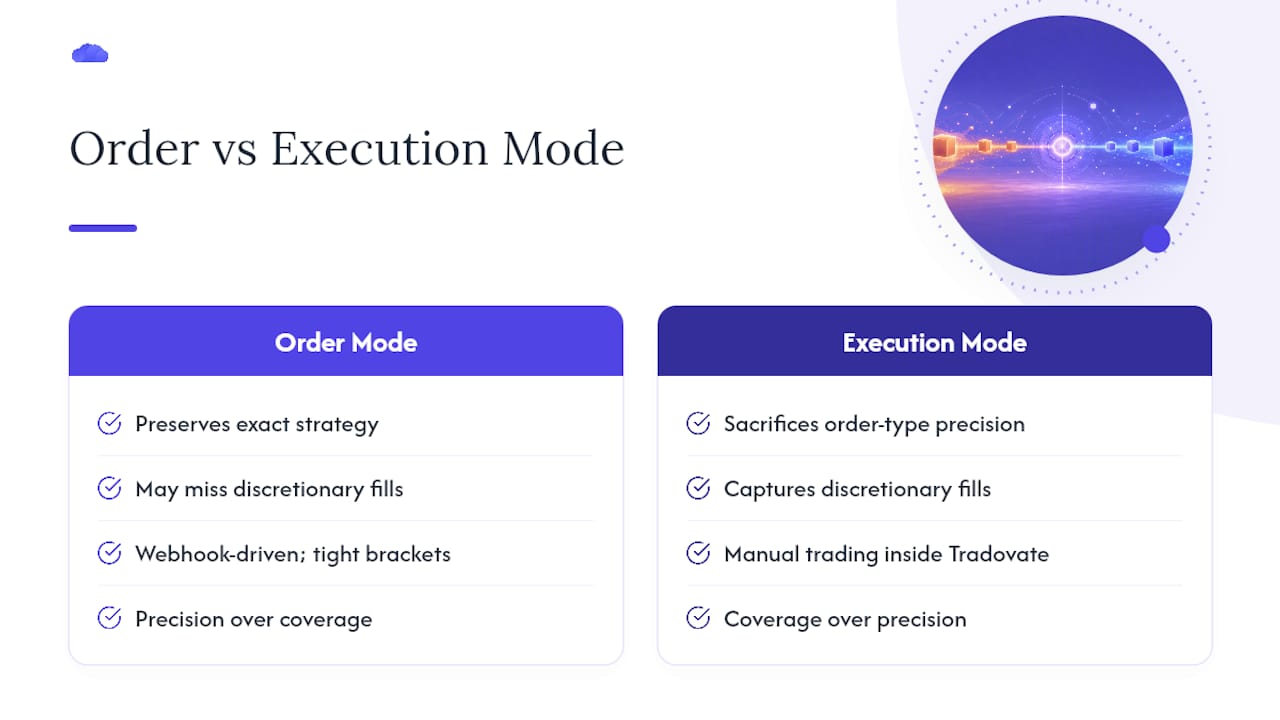
Most write-ups treat order mode and execution mode as a simple upgrade path, as if execution mode is just the better version. It isn't. It's a tradeoff between fidelity and coverage, and the correct answer depends entirely on how you trade. If your edge lives in a webhook-driven strategy with tight brackets, order mode preserves exactly what you built. If you trade manually inside Tradovate and need every discretionary fill captured, execution mode is the only option that works, even though it sacrifices order-type precision along the way.
The bigger blind spot is expecting a copier to run itself. Rejections happen. Small PnL drift between leader and follower happens. A system that logs these events and alerts you is doing its job; a system that tries to auto-retry blindly is setting up a bigger mistake down the line. The traders who run five or ten funded accounts without blowing one up aren't running fancier software. They're the ones who ramped in small steps, watched their logs daily, and kept per-account caps conservative even after months of clean execution.
> — Andres
Try TradeDupe for Tradovate Multi-Account Sync
TradeDupe is built specifically for Tradovate prop-firm traders, not as a generic multi-broker bridge trying to cover every platform at once. It connects through Tradovate's official OAuth flow, so your password is never stored and nothing runs on a local PC or VPS you have to babysit.

Fills on your leader account mirror to every enabled follower typically within about 100 milliseconds over live WebSocket streams, and some platforms support Tradovate-based firms including Apex Trader Funding, Tradeify, Lucid Trading, MyFundedFutures, Alpha Futures, and TakeProfit Trader. Rogue-trade detection, per-account toggles, execution-mode controls, and daily loss limits enforced directly on Tradovate come standard, so the broker itself backs up your risk rules. Subscription plans are offered at varying monthly rates billed yearly, and many include a free trial with cancellation options. Sign up, link your demo account and your smallest eval, and run the getting-started walkthrough before committing real size to the copy.
Sources
- Copy Trading Multiple Prop Firm Accounts on Tradovate (Apex, Topstep, TakeProfitTrader, MyFundedFutures, EliteTraderFunding, TradeDay) - Traders Helping Traders - Tradovate Forum
- CrossTrade Tradovate copier docs - tradovate-copier
- CrossTrade getting-started: managing multiple Tradovate accounts
FAQ
What Is Sync Monitoring Trading in Tradovate Prop Accounts?
It refers to tracking and maintaining real-time trade mirroring across multiple Tradovate prop-firm accounts, confirming that every leader fill copies correctly and on time to each follower.
Does Execution Mode Preserve My Order Types on Followers?
No. Execution mode watches the leader's broker-level fills and replicates them as market orders on followers, which means limit orders and bracket structures aren't preserved the way they are in order/signal mode.
How Fast Should Trade Mirroring Be Across Accounts?
Cloud-based WebSocket copiers with minimal hops report execution in the sub-50ms range in trader comparisons, and TradeDupe specifically targets mirroring around 100 milliseconds.
What Happens if My Copier Goes Offline Briefly?
Well-built copiers run a bounded catch-up on reconnect rather than replaying every stale signal, and drift corrections are rate-limited to avoid flooding a lagging follower with delayed orders.
How Much Does TradeDupe Cost?
TradeDupe's Standard plan runs $20 per month billed yearly, Pro is $45 per month billed yearly, and Elite is $90 per month billed yearly, each with a 7-day free trial.
Recommended
- What Is Real-Time Trade Synchronization for Prop Traders?
- Protect Prop Desk Capital With 34ms Tradovate Selective Copy Trading
- Prop Desks: 100ms Tradovate Integration with T0 to T3 Audit Trail
- Tradovate Trade Copier | Real-Time Account Sync
For educational purposes only. Not financial advice. Futures trading involves substantial risk of loss and is not suitable for every investor.