
Copy Trading Maintenance Windows for Prop Desks and Ops Teams
TradeDupe
15 min read
Manage your copy trading effectively during maintenance windows. Learn proactive strategies to avoid liquidity issues and safeguard your capital.
Scheduled maintenance windows put copy trading in a state of reduced or zero execution capability, not a brief pause you can safely ignore. Treat every published window as a near-zero liquidity event and manage exposure before it starts, not during it. That means acting early, on a fixed clock, rather than reacting once fills stop matching or alerts start piling up.
The immediate checklist for any desk running follower accounts:
- Pause new copy orders across all follower accounts at least 15 minutes before the window opens.
- Reduce or close high-leverage positions that could breach margin and liquidation rules if you cannot intervene mid-window.
- Notify followers and internal stakeholders with start/end times and expected impact.
Verdict: the desks that avoid liquidation surprises are the ones that plan around the maintenance calendar, not the ones with the fastest reconnect logic.
Key Takeaways
Maintenance-aware copy trading requires pausing execution ahead of a window, queuing orders durably during it, and reconciling fills before resuming normal activity.
| Point | Details |
|---|---|
| Treat windows as zero liquidity | Reduce or close high-leverage positions before any scheduled window starts. |
| Retry logic isn't reconciliation | Idempotency keys and durable queues prevent duplicate or out-of-sequence fills. |
| Per-account toggles limit blast radius | Isolating one follower's pause state protects the rest of the book during outages. |
| Stage the resume, don't rush it | Canary rollouts catch reconciliation problems before they hit every account. |
| TradeDupe builds these controls in | Per-account toggles, auto-recovery, and rogue-trade detection handle the checklist automatically. |
Table of Contents
- How Scheduled Maintenance Windows Disrupt Copy Trading Operations
- Why Simple Retry and Reconnect Logic Fails for Copy Trading
- Expected Behaviors for Maintenance-Aware Copy-Trading Systems
- Operational Benefits and Measurable Outcomes From Being Maintenance-Aware
- Why Maintenance Awareness Matters at Scale for Multi-Account Desks
- Concrete Pre/During/Post Scheduled Maintenance Checklist
- How to Test and Monitor Maintenance Behavior Before Production Windows
- Platform Configuration and API Considerations for Scheduled Windows
- Incident Response and Recovery After Unplanned Extended Outages
- Common Maintenance Schedules and Example Durations to Plan For
- How to Notify Followers and Internal Teams About Scheduled Windows
- How TradeDupe Implements Maintenance-Aware Copy Trading
- Operational Priorities for Prop Desks Managing Maintenance Windows
- TradeDupe Handles the Maintenance Window So You Don't Have To
- Frequently Asked Questions
- Sources
How Scheduled Maintenance Windows Disrupt Copy Trading Operations
A maintenance window often impacts multiple systems including exchange execution, market data feeds, API gateway, clearing firm, and copy-trading infrastructure, sometimes simultaneously. A dashboard can stay fully responsive while the exchange behind it has execution disabled, which means your interface tells you nothing is wrong while your followers' orders sit dead in the water. Kraken's documentation on perpetual futures maintenance confirms this layered exposure directly: trading can be suspended, the order form disabled, and orders are simply not queued for later execution.
The failure modes that follow are predictable once you've seen them: disabled order forms that silently reject copy signals, fills that arrive minutes late and no longer match your leader's price, and account transfers that get suppressed without warning. Followers end up holding positions the leader account already exited. Ops teams end up buried in alerts that all say the same thing, which is the definition of alert fatigue.
Why Simple Retry and Reconnect Logic Fails for Copy Trading
Simple retry-until-success approaches can cause issues in copy trading, as retries do not properly handle sequence or state. A naive retry loop that fires the moment connectivity returns can send the same order twice, doubling a follower's position size, or execute trades out of the order the leader actually placed them in.
The core risks:
- Idempotency gaps: without a unique key per order, a retried request can duplicate a fill instead of confirming one.
- Price drift: Oqtima's maintenance notice warns that provider actions taken during downtime may still get copied once service resumes, often at materially different prices than when the leader acted.
- Rejected queues: orders queued informally at the copy layer can be rejected outright when the exchange resumes, leaving followers unexpectedly flat while the leader is positioned.
Retry logic treats downtime as a delay. Copy trading needs to treat it as a state discontinuity.
Expected Behaviors for Maintenance-Aware Copy-Trading Systems
A system built for maintenance windows behaves differently at each stage, and the difference shows up in whether your team sleeps through the window or spends the next morning reconciling fills by hand. Before the window, it should pause outbound execution attempts gracefully rather than let requests pile up against a wall. During the window, it should hold pending actions in a durable, idempotent queue instead of dropping them or spamming retries. After the window, it should auto-resume with reconciliation baked in, not just a green status light.

Picture the data flow as two competing paths. In a disabled execution path, a leader's trade fires, the copy engine tries to forward it, the exchange API rejects it, and the system either drops the order or retries blindly. In a maintenance-aware path, the leader's action still fires, but the copy engine recognizes the maintenance flag, writes the order to a durable queue with an idempotency key attached, and only releases it once the exchange confirms it is fully synchronized again.
The operational controls worth demanding from any platform, including the one you build yourself:
- Per-account toggles so one follower can be paused without freezing the whole book.
- Maintenance calendar sync so the system knows a window is coming before the exchange throws an error.
- API status checks polled on a short interval, not assumed from the last successful call.
- Auto-resume safeguards that verify state before releasing queued orders, not just on a timer.
This queuing pattern mirrors a practice from managed file transfer operations, where securely queuing deliveries during a known window prevents both data loss and the alert storm that follows a rushed catch-up.
Pro Tip: Favor server-side durable queues with idempotency keys over client-side retry timers. A client-side timer only knows its own clock; a server-side queue knows the actual state of the order and won't fire it twice just because a connection blinked.
Operational Benefits and Measurable Outcomes From Being Maintenance-Aware
Maintenance-aware handling shows up in numbers your ops team can track, not just in fewer headaches. Watch for a drop in manual reprocessing events, shorter reconciliation windows after each maintenance cycle, and fewer missed-fill incidents reported by followers.
A useful internal benchmark: track median resume latency, the time between maintenance ending and the first confirmed, reconciled copy trade. A shrinking median resume latency, paired with a falling count of reprocessing tickets, is the clearest signal your queuing and reconciliation logic is actually working rather than just running.
- Fewer duplicate or rejected orders after resume.
- Cleaner audit logs with fewer manual overrides.
- Lower support ticket volume tied to "why didn't my trade copy" questions.
For a desk running dozens of follower accounts, cutting even a handful of missed-fill incidents per month directly protects P&L, since each one is a follower either overexposed or under-hedged relative to the leader.
Why Maintenance Awareness Matters at Scale for Multi-Account Desks
A single provider outage or datacenter reset can ripple across hundreds of follower accounts simultaneously, and the damage compounds with every account added. Margin rules and funding payments often stay active even when execution is suspended, so a follower who can't close a position during a window can still get margin-called by rules that never paused. That combination, frozen execution plus live liquidation risk, is where multi-account desks take real losses.
Per-account toggles stop being a convenience at scale and become the only practical way to isolate risk. Orchestration matters just as much: a desk that can pause, stage, and resume accounts in batches avoids the scenario where every follower reconnects at once and floods the exchange API the moment it comes back online.
- One provider's reset can cascade into a liquidation event across an entire follower book.
- Funding and margin obligations often remain live during suspended execution.
- Batch orchestration and per-account controls limit blast radius when something goes wrong.
Concrete Pre/During/Post Scheduled Maintenance Checklist
Timing discipline separates the desks that shrug off a maintenance window from the ones that spend the next day untangling positions. Lead time matters more than reaction speed here.
| Window Phase | Lead Time | Action |
|---|---|---|
| Pre-window | 24 hours | Confirm maintenance calendar entry and cross-check against exchange or vendor notice. |
| Pre-window | 2 hours | Warn followers, reduce high-leverage exposure, snapshot open positions and margin. |
| Pre-window | 15 minutes | Set per-account toggles to pause, confirm queue is clear of stale orders. |
| During window | Ongoing | Suppress non-actionable alerts, monitor heartbeats, avoid large transfers. |
| Post-window | 15 minutes | Verify API status before resuming; stage rollout by account tier. |
| Post-window | 15 to 60 minutes | Reconcile fills, revalidate margin and protection orders, report to stakeholders. |
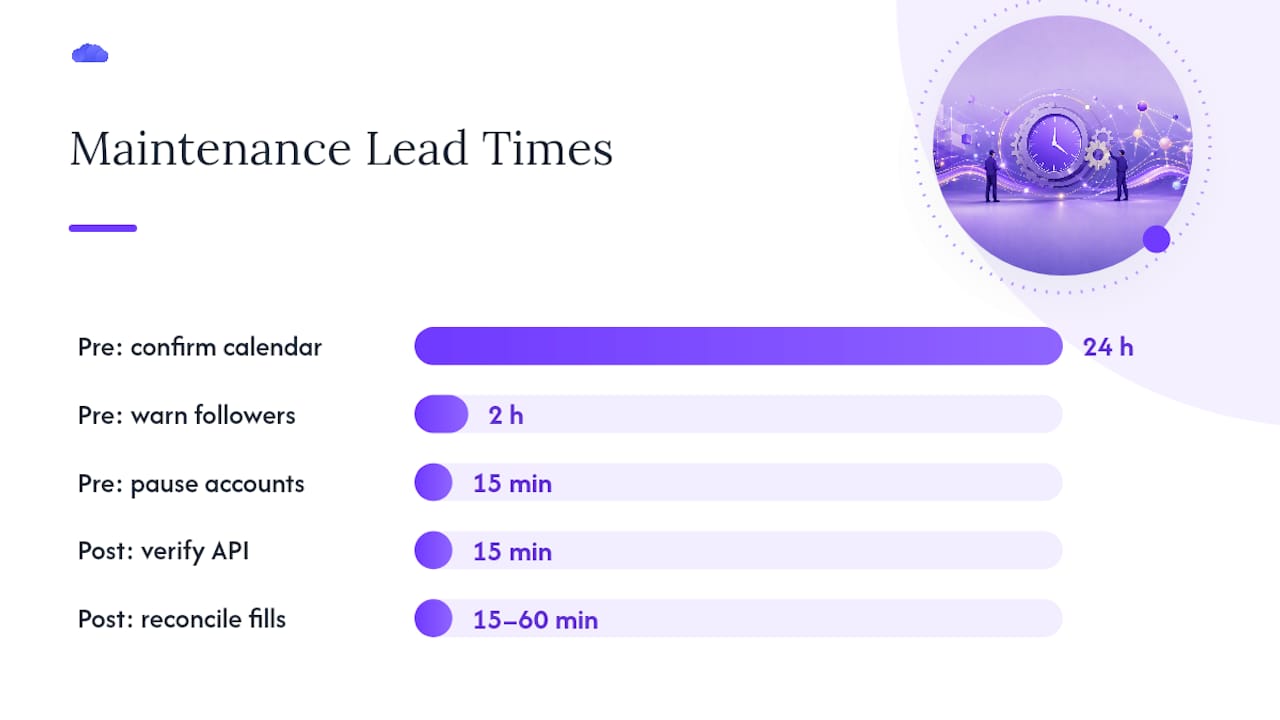
Interactive Brokers' published reset windows illustrate why the 24 hour check matters for global desks: North America, Europe, and APAC resets happen at different local times, and a calendar built around one region will blindside you in another.
Pro Tip: Automate the position and margin snapshot so it fires on a schedule tied to the maintenance calendar, not on someone remembering to run it. A missed snapshot is the single most common reason reconciliation takes hours instead of minutes.
How to Test and Monitor Maintenance Behavior Before Production Windows
Testing maintenance handling in production, during an actual window, is how teams discover their queuing logic doesn't work. Run the test before the exchange forces the issue.
- Schedule regular dry runs that simulate an API-disable event without touching live orders.
- Use traffic shaping to mimic a datacenter reset, including the connection drop and the delayed recovery.
- Run a canary rollout on resume: release queued orders to a small subset of accounts first, confirm clean reconciliation, then release the rest.
Key metrics worth putting on a dashboard: heartbeat latency, queue depth, resume latency, reconciliation delta, and the count of orders rejected after resume.
- Warning threshold: queue depth climbing steadily with no drain, check for a stuck idempotency lock.
- Critical threshold: reconciliation delta above your account's normal fill variance, halt further resumes and investigate manually.
- Escalation: any rejected-order count above zero post-resume should trigger a manual review before the next batch releases.
Platform Configuration and API Considerations for Scheduled Windows
Configuration is where maintenance awareness either gets built in or gets skipped. The essentials: import the maintenance calendar directly rather than tracking it manually, set per-account pause toggles, configure durable queue retention, generate idempotency keys per order, and poll the API status endpoint on a cadence tight enough to catch a flag change within a minute or two.
Watch specific API fields: a status endpoint response indicating a maintenance flag, retry headers indicating a backoff interval, and any field distinguishing "temporarily unavailable" from "permanently rejected." Treating those two as the same thing is how duplicate orders happen.
- Confirm whether the vendor SLA states an expected resume time, and document it in your runbook, not just in a support ticket.
- Cross-check the vendor's published SLA against actual historical resume times, since Kraken's own documentation notes that quarterly extended maintenance can run roughly four hours, well beyond a standard weekly window.
- Build your runbook around the worst documented case, not the average one.
Incident Response and Recovery After Unplanned Extended Outages
Unplanned outages need a different sequence than planned windows, because there's no calendar warning and no clean pause point. Speed and order of operations both matter.
- Triage first: freeze any automated resend logic immediately so a partial outage doesn't turn into duplicate orders once connectivity flickers back.
- Protect margin on accounts closest to liquidation before touching anything else.
- Communicate status to stakeholders and followers, even if the message is just "we are aware and investigating."
- Reconcile executed fills against expected fills, then identify any missing protection orders, since a documented PrimeXBT copy-trading module outage showed that pending protection orders are not always restored automatically once service resumes.
- Restore idempotent state last, once you've confirmed no duplicate or missing orders remain.
Prioritize accounts by liquidation proximity, not by alphabetical order or ticket arrival time.
Common Maintenance Schedules and Example Durations to Plan For
Maintenance patterns vary by broker and exchange, but three shapes recur often enough to plan around: short daily resets, longer weekly windows, and infrequent extended upgrades.
- Daily resets typically last between half an hour and an hour and a half, often occurring overnight in the exchange's local time zone.
- Weekly maintenance windows generally span several hours, often scheduled on weekends when trading volume is low.
- Quarterly or major upgrade windows may last multiple hours and occasionally include a rolling restart phase.
Hibt's futures maintenance notice gives a concrete example: a 60-minute scheduled upgrade during which Futures Copy Trading services are suspended entirely. For desks running accounts across time zones, always plan around the longest regional restart sequence, not the shortest, since a follower in another region may still be inside the window after your local clock says it's over.
How to Notify Followers and Internal Teams About Scheduled Windows
A predictable notification cadence keeps followers from making risky decisions out of confusion during a window they didn't know was coming.
- Publish the calendar entry as soon as the vendor or exchange confirms it, ideally 48 hours ahead.
- Send a reminder at 4 hours out and again at 30 minutes out, through whichever channel your followers actually check.
- Send an immediate alert the moment maintenance starts and another the moment it ends, confirming systems are reconciled and safe to resume trading.
Use a status page, email, in-app banners, a webhook status endpoint for automated systems, and SMS reserved for priority ops contacts who need to act fast. A message template should always include start and end times, which features are affected, the expected impact on open positions, and a direct contact channel. Status-monitoring services that track copy-trading uptime can automate part of this, feeding your webhook without anyone manually checking a vendor's page.
How TradeDupe Implements Maintenance-Aware Copy Trading
TradeDupe was built around the exact failure modes this guide describes, because Tradovate-based prop desks run into them constantly. Per-account toggles let an operator pause a single follower without touching the rest of the book. Auto-recovery brings accounts back online in a staged sequence rather than all at once. Rogue-trade detection flags anything that looks like a stale or duplicated order the moment execution resumes, and every action, paused, queued, or replayed, lands in an audit log operators can review after the fact.
> A prop desk running a dozen Apex accounts through TradeDupe used per-account pause toggles ahead of a scheduled weekly exchange reset, then let auto-recovery stage the resume by account tier. No follower carried an unprotected position through the reset window, and reconciliation the next morning took minutes instead of hours.
For teams configuring these controls, the futures trade copier product page covers the toggle and recovery setup in detail, and the getting started guide walks through initial account connections for Tradovate-based desks.
Operational Priorities for Prop Desks Managing Maintenance Windows
Exposure control beats optimistic retries every time. A desk that closes risk before a window and reconciles carefully after it will always outperform one betting that reconnect logic fires cleanly on the first try. That's not caution for its own sake, it's just where the losses actually happen.
The real trade-off isn't availability versus safety, it's staged resume versus immediate resume. Immediate resume feels faster but releases every queued order into a market that may have moved. Staged resume costs a few extra minutes and buys certainty that nothing doubles up or executes at a stale price. For multi-account desks, that certainty is worth far more than the minutes it costs.
TradeDupe Handles the Maintenance Window So You Don't Have To
The checklists in this guide describe what disciplined manual operations looks like. TradeDupe builds that discipline into the platform itself, so your desk isn't manually toggling accounts and snapshotting positions every time a maintenance calendar entry comes up.

Per-account toggles let you pause specific followers in seconds, auto-recovery stages the resume so queued orders don't all hit the exchange at once, and rogue-trade detection catches anything that looks off before it becomes a liquidation problem. Combined with median execution latency of 34 milliseconds under normal conditions, the platform is built to make the transition into and out of a maintenance window as uneventful as possible. If your desk runs multiple Tradovate accounts across Apex, Tradeify, Lucid Trading, or Alpha Futures, start with the futures trade copier setup and connect your first accounts through the getting started guide today.
Frequently Asked Questions
What are copy trading maintenance windows? They are scheduled periods when a broker, exchange, or copy-trading platform takes execution, data, or account functions offline for upgrades or resets, during which copy-trading orders may not process normally.
How long do typical maintenance windows last? Daily resets often run 30 to 90 minutes, weekly windows run 1 to 4 hours, and quarterly upgrade windows can extend to several hours depending on the platform.
Can I still get liquidated during a maintenance window? Yes. Margin and funding rules frequently stay active even when order execution is suspended, which is why reducing exposure before the window matters more than reacting during it.
Does TradeDupe pause copy trading automatically during broker maintenance? TradeDupe's per-account toggles let operators pause specific accounts ahead of a known window, and auto-recovery manages a staged resume once the underlying broker connection is confirmed stable.
What's the biggest mistake trading ops teams make with maintenance windows? Relying on simple retry logic instead of durable, idempotent queuing, which risks duplicate fills or orders executing at prices far from where the leader originally traded.
This article is general information, not a substitute for advice from a qualified financial advisor. Consult a qualified financial professional about your own circumstances before acting on anything here.
Sources
- Maintenance windows for US Perpetual Futures | Kraken Support
- Hibt Futures Trading Service Upgrade and Maintenance Notice (2026-08-07 22:00 UTC) – Hibt
- Interactive Brokers systemStatus
- Scheduled System Maintenance Notice – July 25th and 26th 2026 – OQTIMA NEWSROOM
- PrimeXBT Copy-trading module outage — Oct 2023 | IsDown