Tradovate Sim Copy Trading: What Works and Where Delay Comes From
TradeDupe
12 min read
Can you copy trades from a Tradovate sim account to prop firm accounts? Learn what Group Trade does, where time delay creeps in, and how to test safely.
You can copy trades across Tradovate accounts, and you can practice the whole routine in simulation first. But Tradovate's built-in tool has a narrow scope, and the rules of the prop firm that issued each account decide what you may do. The reliable path is to rehearse the leader-and-follower setup in sim, confirm each firm's copy policy in writing, and then run live with a copier built for Tradovate prop accounts, such as the futures trade copier we make at TradeDupe.
This guide covers what Tradovate's Group Trade can and cannot do, what "time delay" means in copy trading, how to test a setup in sim, and which rules to confirm before you mirror a single order.
TL;DR
- Tradovate's own Group Trade only groups accounts that sit with the same brokerage provider, and its documentation says a Tradovate brokerage account cannot be grouped with an evaluation-service account.
- Group Trade does not support bracket or ATM orders, so a stop and target attached to your entry will not follow to the other accounts.
- Delay in copying comes from the path an order takes, from how you place orders, and from the platform itself. A delay does not turn mismatched copying into compliant copying at firms that prohibit it.
- Copy only between accounts you own and manage, and confirm each firm's current policy in its help center before you start.
- Rehearse in sim first: same instrument, same size, a full day of entries, exits and partial fills before anything funded is connected.
Table of Contents
- What "Tradovate sim copy trading" actually means
- What Tradovate's Group Trade copies, and what it does not
- Time delay in copy trading: what it is and where it comes from
- Check the rules before you copy anything
- How to test a Tradovate copy setup in sim
- When orders fail to copy: what to check
- Where a dedicated Tradovate copier fits
- Our perspective
- FAQ
- Sources
What "Tradovate sim copy trading" actually means
Tradovate lets you switch between live, simulation and market replay modes. According to Tradovate's platform page, the simulation environment uses real-time market data, and the page cautions that simulated results may not resemble actual trading results. The same page says live funded accounts keep access to real-time simulation, and that sim charges standard exchange, NFA and clearing fees, with other plan-dependent fees possibly applying.
That matters because most readers searching this phrase want one of three things:
- Practice the copy setup before risking an evaluation fee.
- Copy a sim leader to several follower accounts, usually evaluation accounts from one or more prop firms.
- Understand why followers fill later or differently than the leader.
The first is straightforward. The second depends on who issued each account and what the firm allows. The third is a matter of mechanics, covered below.
What Tradovate's Group Trade copies, and what it does not
Tradovate ships a native feature called Group Trade. Per Tradovate's help article on trading once across multiple accounts (updated July 5, 2023), groups are limited to accounts with one brokerage provider. Its own example says a Tradovate brokerage account cannot be grouped with an evaluation-service account, while accounts at the same provider can be grouped.
In practice, that means:
- Accounts from different providers cannot share one group.
- You build the group from a single order ticket, and every order you place there is sent to all members.
- The article says bracket/ATM orders are not supported in Group Trade, although you can enter stop and limit orders manually.
That last point is the one that bites. If your routine is to enter with an attached stop and target, you will be managing protective orders by hand on every grouped account.
How group quantities work
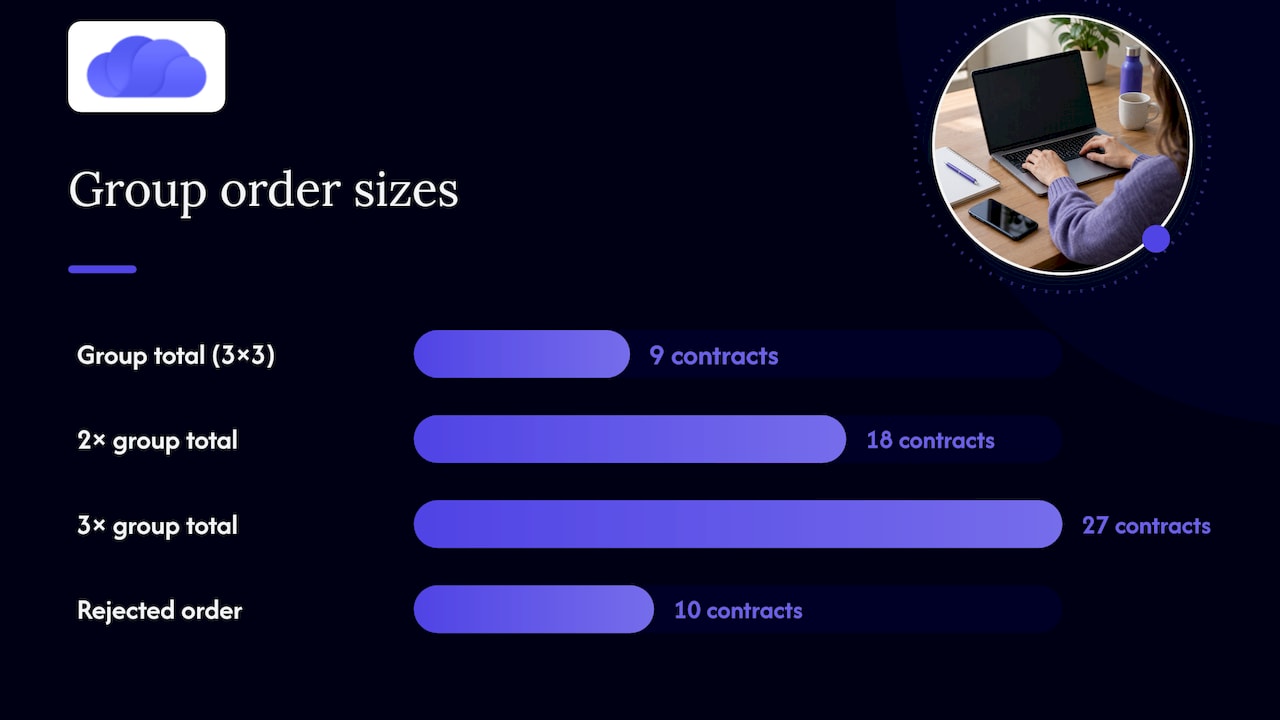
Tradeify's help center describes the same feature from the firm's side. In its Tradovate order entry and copy trading article (dated January 2026), you create a group through the Accounts dropdown and "Manage Groups", drag in the accounts, and set a contract amount per account. Every account receives the same quantity, and your order size must be a multiple of the group's total quantity.
A worked example from that logic: three accounts at 3 contracts each make a group total of 9. You can then trade 9, 18 or 27, but not 10. If you want to scale in with 4 contracts, the group will not accept it. For a trader who scales in and out, that rigidity is a real constraint, because equal distribution also means you cannot size one account differently from another.
Time delay in copy trading: what it is and where it comes from
When traders ask about "time delay" in copy trading, they usually mean one of two things: the gap between your fill on the leader and the matching fill on a follower, or a deliberate offset someone adds between accounts. They are different problems.
Unintended delay: the gap between leader and follower
A follower fill can trail the leader for a few ordinary reasons:
- The path of the order. A copier that runs on your own computer depends on that machine, its connection and whether it stays awake. A server-side copier does not depend on your PC or a VPS.
- Order type. A market order and a resting limit order behave differently. A limit that fills on the leader may not fill on a follower at the same moment, because each account has its own place in the queue.
- Missing protective orders. If brackets do not copy, a follower can sit unprotected until you place the stop manually.
- Exchange-level controls. Regulators have long pushed exchanges to apply pre-trade risk controls to all electronic orders, such as order-size limits and message throttles. The CFTC's proposal, published in the Federal Register on July 15, 2020, notes that excessive messaging can add latency for other market participants. Heavy messaging is one more reason to keep your own order flow clean.
The practical takeaway is not to chase a number. It is to ensure that every account sees the same instrument, size and order type, and that you have a way to know when a follower did not fill.
Deliberate delay: staggering entries across accounts
Some traders add a pause between accounts, hoping it looks less like copying. Do not assume that works. Top One Futures' copy trading policy says that delayed manual mirroring across mismatched account types or sizes can still count as prohibited copying when the first position remains active, and that a delay of minutes or an hour does not make it permissible. The same policy allows copying only between accounts of the exact same program and size.
That is one firm, and every firm writes its own rules. But it shows how a firm can read the intent of your trading rather than the timing. If a firm's rules prohibit what you are doing, a delay is not a fix.
Check the rules before you copy anything
Sim practice teaches you the mechanics. It does not tell you what a firm permits on funded accounts. Treat this as a checklist:
- Ownership. Tradeify's January 2026 help page says group trading may be used only among accounts you own and manage, and that copying other strategies or trading with others is not permitted.
- Matching. Some firms, like Top One Futures, restrict copying to identical program and size. Check whether your firm does.
- Responsibility. Tradeify's page also says third-party copier use is at your own risk and that it is not responsible for resulting errors or support for those issues. Know who answers when something misfires.
- Consistency and payout rules. Copying the same trades across accounts means the same profit pattern on each. If a firm has a consistency rule, every account hits it at the same time. Our consistency rules comparison lays out the differences.
- Confirm with the firm. Rules change. Open the firm's help center, read the current copy trading article, and if anything is unclear, ask support and keep the reply.
For firm-by-firm detail, see our pages on which futures prop firms allow copy trading, Apex copy trading rules and MyFundedFutures' own-accounts-only policy. Topstep and Alpha Futures are not on Tradovate, so none of this Tradovate setup applies to them.
How to test a Tradovate copy setup in sim
A useful sim test is boring and thorough. Here is a routine you can follow.
- Pick the leader. Choose one account as the single place you click. Everything else is a follower.
- Match the conditions. Use the same instrument and the same contract month on every account. Confirm each follower's size limits so a copied order does not exceed one account's cap.
- Start with one contract. Place a market order and confirm that every follower shows the fill and the same average price, give or take normal slippage.
- Test exits. Flatten from the leader and confirm that every follower flattens. A copier that opens well but closes unevenly is the most common source of surprise.
- Test limit and stop orders. Place a resting limit, modify it, then cancel it. Check that each follower's working order matches.
- Test brackets. If you use an attached stop and target, check what happens on followers. With Group Trade, expect to place them manually.
- Test partial fills. Use a thinner contract or a limit order that fills in pieces, and see whether followers reflect the same pattern.
- Turn one follower off. Confirm you can pause a single account without disturbing the others.
- Run a full session. One clean trade proves little. Run a normal day of entries, adds and exits before you connect anything that costs money.
Keep a short log of what you saw. If something differs in sim, it will differ live.
When orders fail to copy: what to check
If a follower misses a fill or ends up in a different position, work through this list in order:
- Position check. Compare the net position on every account right now, before you do anything else. Flatten the odd one out manually if needed.
- Quantity rules. If you use Group Trade, confirm the order size was a multiple of the group total.
- Account state. A disabled, locked or breached follower will not take orders. Check status on each account.
- Order type. Brackets, ATM strategies and some advanced order types do not copy in Group Trade.
- Instrument and contract month. A follower on a different contract month will not match.
- Connection. If the copier runs on your machine, check that it is awake and online. A server-side copier removes that variable.
- Firm restrictions. Some firms limit order types, sizes or trading hours on certain accounts.
Then write down what happened. Patterns show up quickly in a log.
Where a dedicated Tradovate copier fits
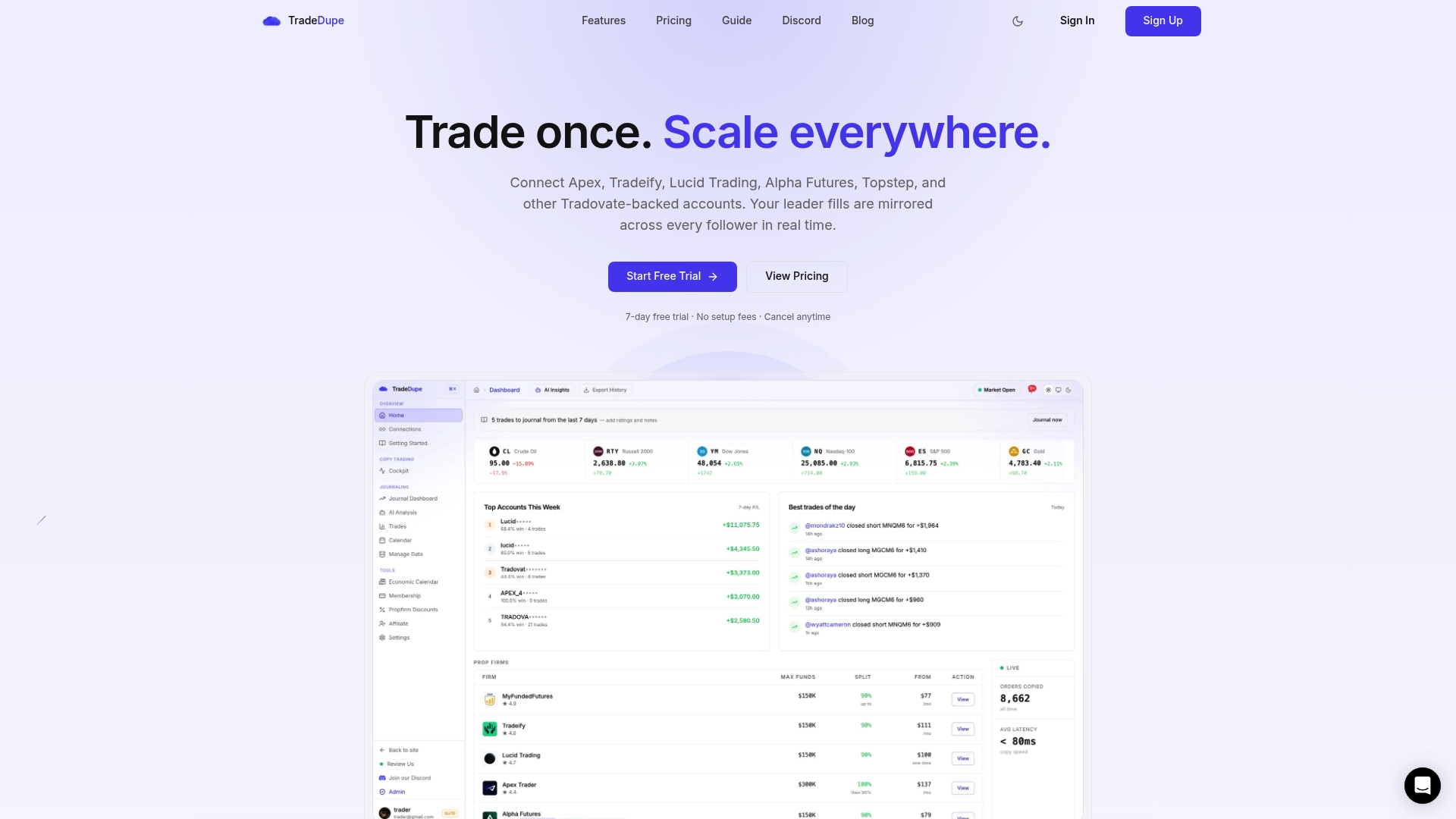
Group Trade is useful when your accounts share one provider and you trade without brackets. Many prop traders hold accounts at several firms, and this is where a purpose-built copier earns its place. TradeDupe connects through Tradovate's official OAuth flow, so your password is never stored, and mirrors every fill on your leader account to the follower accounts you enable, over live WebSocket streams. Nothing runs on your PC or VPS.
The safeguards map to the failure points above: rogue-trade detection flags follower trades the copier did not place, per-account toggles let you pause one account, and daily loss limits and profit targets are set directly on Tradovate so the broker enforces them. Our guide to prop firm trade copiers covers setup in more depth, and the Tradovate copy trading walkthrough shows multi-account configurations.
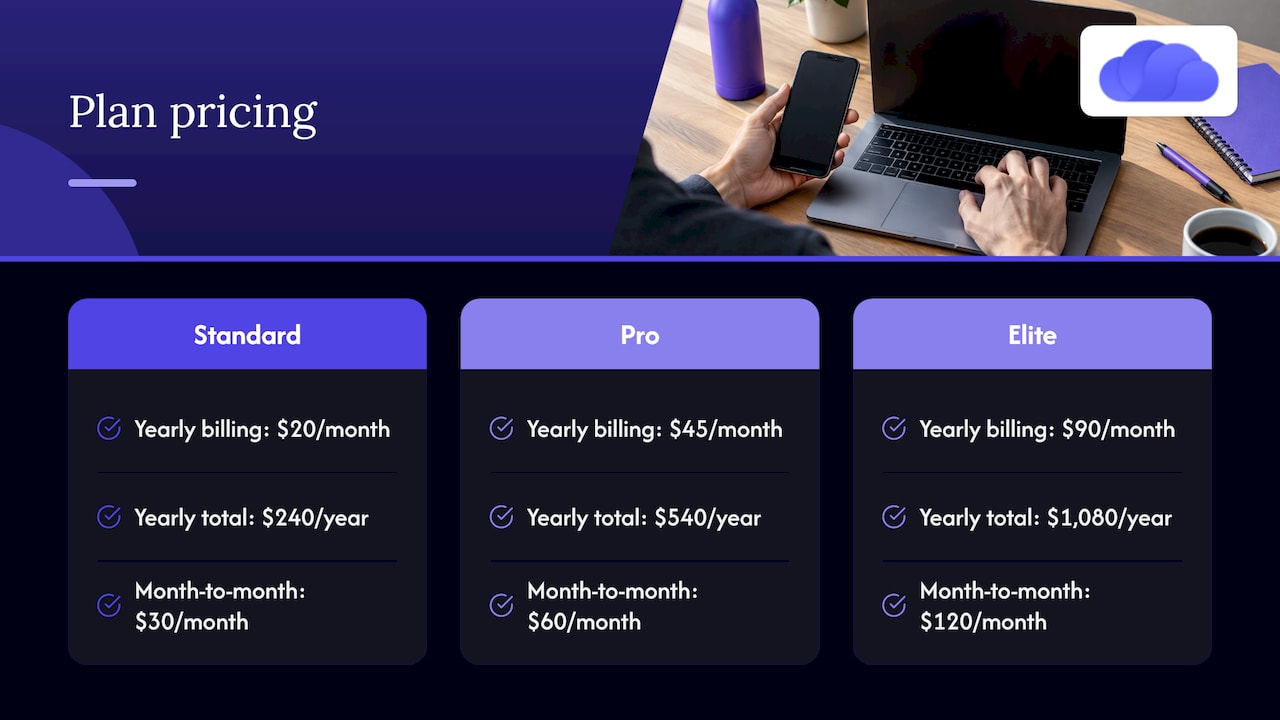
It supports Tradovate-based firms including Apex Trader Funding, Tradeify, Lucid Trading, MyFundedFutures and TakeProfit Trader. Plans are flat rather than per account: Standard is $20/month billed yearly ($240 per year) or $30 month to month, Pro is $45/month billed yearly ($540 per year) or $60 monthly, and Elite is $90/month billed yearly ($1,080 per year) or $120 monthly. Every plan includes a 7-day free trial with one-click cancellation. You can see the details on the pricing page.
Whichever tool you pick, your firm's policy still governs. A copier changes how orders travel, not what a firm allows.
Our perspective
> We built TradeDupe for one job: Tradovate prop traders who hold several accounts and want to click once. That narrow focus is deliberate. A generic multi-broker bridge has to handle every platform's quirks. We only handle Tradovate, so the setup is short and the failure modes are few. > > The most common mistake we see in how traders think about copying is treating it as a speed contest. The real questions are whether every account got the order, whether anything traded that the copier did not place, and whether your loss limits are enforced even if your screen freezes. That is why we put rogue-trade detection in, and why daily loss limits are set on Tradovate itself, so the broker enforces them rather than a program on your computer. > > Rehearse in sim, read your firms' rules, and keep your accounts matched. Do that, and copying becomes a tool for discipline rather than a source of surprises. > > Andres
FAQ
Can I copy a Tradovate sim account to prop firm evaluation accounts?
Tradovate's Group Trade documentation says groups are limited to accounts with one brokerage provider, and that a brokerage account cannot be grouped with an evaluation-service account. Whether a given firm lets you copy between its accounts is the firm's decision, so read its help center first. A copier connected through Tradovate's OAuth can mirror a leader to followers you enable, as long as your firms permit it.
Does Group Trade copy bracket orders?
No. Tradovate's documentation says bracket and ATM orders are not supported in Group Trade, though you can enter stop and limit orders manually. Plan to place protective orders on each grouped account yourself, or test how your copier handles them in sim.
Will adding a time delay between accounts keep me within firm rules?
Not reliably. Top One Futures' policy states that a delay of minutes or an hour does not make mismatched copying permissible while the first position stays active. Firms judge what you are doing, not only when you do it. Confirm the policy with your firm before you stagger anything.
Is it allowed to copy trades between my own accounts at different firms?
It depends on each firm. Tradeify's help page, dated January 2026, allows group trading only among accounts you own and manage. Other firms set stricter limits, such as identical program and size. Check each firm's current help center article and ask support if anything is unclear.
Sources
- Tradovate Help: Can I trade once and have orders sent to multiple accounts?
- Tradovate: Trade on a modern futures trading platform
- Tradeify Help Center: Tradovate Order Entry & Copy Trading
- Top One Futures Help Center: Copy Trading Policy
- Federal Register: Electronic Trading Risk Principles
Recommended
- Trade Copier Latency: What Speed You Actually Need
- Copy Trading Slippage: Why Fills Lag Across Tradovate Prop Accounts
- Event-Driven Trade Copying on Tradovate: How It Works
- Server-Side Execution for Tradovate Copy Trading Explained
For educational purposes only. Not financial advice. Futures trading involves substantial risk of loss and is not suitable for every investor.