34ms Mirroring: Link Tradovate Accounts for Prop Desks
TradeDupe
8 min read
Link Tradovate accounts the operator way: enable API/OAuth, set leader/follower scaling, run staged tests, and add per account risk controls.
Linking Tradovate accounts for multi-account mirroring means designating one account as the leader and connecting each follower account through a copier using API keys or OAuth. You enable API access inside each Tradovate account, add every follower as a separate connection, set per-account scaling, and run staged tests before you go live. Before any of that, check your prop firm's copy trading policy. A platform like TradeDupe handles the connection layer after your accounts and policies are in order.
*
> TL;DR: > > - Confirm each prop firm's copy trading policy and ensure API access is enabled with secure token storage before linking accounts. > - Use a third-party copier like TradeDupe to connect accounts via API or OAuth, with staged testing and specific scaling rules to minimize errors. > - Route orders either through webhooks with Pine Script or direct server-side API broadcasts, with broadcast methods reducing slippage during high-speed trading. > - Run thorough tests with small positions during volatile market sessions to verify fill consistency, order propagation, and slippage thresholds. > - Implement and monitor account-level risk controls such as contract caps, global loss limits, and independent fill feeds to prevent large-scale drawdowns.
*
Table of Contents
- What Do You Need to Check Before Linking Tradovate Accounts?
- How Do You Connect and Route Orders Across Tradovate Accounts?
- How Do You Test a Linked Tradovate Setup Before Scaling It?
- How Do You Manage Risk Across Multiple Linked Accounts?
- Why Do Linked Accounts Get Out of Sync, and How Do You Fix It?
- Why Most Multi-Account Rollouts Fail at Scale, Not Setup
- Where TradeDupe Fits Into Your Linking Workflow
- Sources
What Do You Need to Check Before Linking Tradovate Accounts?
Tradovate's built-in Group Trade feature only copies orders between accounts under the same login. It cannot reach a separate prop firm login, which is why anyone running accounts across Apex, Tradeify, or similar firms needs a third-party copier with API or OAuth connections for each account. That single fact trips up more traders than any technical hiccup down the line.
Before you connect a single account, work through these prechecks:
- Enable API access or OAuth in Tradovate. Locate the API credential settings inside each account and generate tokens you can store securely, not in a plain text file on your desktop.
- Decide your leader and follower groups. Pick which account drives trades and how size scales across followers, whether that is a fixed multiplier, a ratio, or a percent of equity.
- Choose your infrastructure. A VPS near your broker's data center reduces latency variance compared to running the copier from a home connection.
- Plan a staged rollout. Start with a small follower group, set daily loss protections per account, and write down what "pass" looks like before you test.
How Do You Connect and Route Orders Across Tradovate Accounts?
Once the prechecks are done, the actual linking process follows a repeatable sequence. Here is the order that keeps errors contained to one account instead of cascading across your whole desk:
- Generate API credentials in each Tradovate account. Log into every account individually, enable API access (or complete OAuth authorization), and copy the resulting keys into your copier's connection manager.
- Add each account as a distinct connection. Your copier should treat every follower as its own entry, never a shared session, so a permissions issue in one account never touches the rest.
- Mark one account as leader. Tag every other account as a follower and assign its scaling rule, whether that is a flat multiplier (1 leader contract equals 2 follower contracts), a fixed ratio, or a percent-of-equity formula tied to each account's balance.
- Pick your execution path. You have two broad patterns here, and they behave differently under load.
The first pattern routes a TradingView alert through a webhook to a cloud hub, which then fans that single alert out to every connected broker account. This works well when your strategy already lives in Pine Script and you want one signal source driving many accounts without touching each one manually.
The second pattern skips the charting layer entirely: the leader account's fills trigger a server-side API broadcast straight to every follower. This tends to run with lower latency because there is no intermediate alert-to-webhook hop, which matters more the more followers you add.
The distinction between simultaneous broadcast and sequential dispatch decides how your tail accounts perform. A copier that processes followers one at a time, in a queue, will consistently give the last account in that queue worse fills during fast markets. Broadcasting orders to all followers at once, or using a multi-threaded dispatch model, keeps that slippage gap from widening as your follower count grows.
Pro Tip: Test your execution path with your slowest, most volatile instrument first. If a broadcast copier handles a fast-moving contract cleanly across ten followers, it will handle everything easier than that without issue.
How Do You Test a Linked Tradovate Setup Before Scaling It?
Never scale past a handful of accounts before running structured tests. Place single-contract trades and verify that entry, stop, and target orders land correctly on every follower, not just the leader.
Watch specifically for:
- Partial fills. Log which followers filled completely and which got a partial, and at what price difference.
- Rejected orders. These usually point to a permissions or instrument mapping problem, not a copier bug.
- Slippage thresholds. Decide in advance what's acceptable (in ticks or dollars) so you're not making that judgment call mid-trade.
- Bracket order propagation. Confirm that stop and target modifications on the leader actually amend the matching orders on every follower.
One detail worth building into your test plan: community reports describe meaningful fill variance when copying sequentially across several prop firm accounts, particularly during fast market moves. That's a strong argument for testing during a volatile session, not a quiet one, before you trust the setup with real size.
Set go/no-go criteria before you start. If any follower shows a rejected order or slippage beyond your threshold, that's a no-go. Fix it, retest, and only then add the next account to your group.
How Do You Manage Risk Across Multiple Linked Accounts?
Running ten or twenty mirrored accounts without account-level guardrails is how a single bad signal turns into a firm-wide drawdown breach. Build these controls in from the start, not after a scare:
- Set per-account contract caps. Each follower should have its own maximum position size matched to that account's clearing permissions and drawdown limit, not a single global setting applied blindly.
- Build an aggregated emergency brake. A global daily loss limit that automatically flattens every position across every account stops a runaway strategy before it touches your entire desk. Where firms calculate drawdown differently (real-time equity versus end-of-day balance), the brake should follow the stricter of the two rules.
- Add instrument filters. Not every follower account should trade every instrument the leader trades, especially if a firm restricts certain contracts.
- Introduce slight size or timing variance where policy risk is elevated. Some prop firm risk engines flag identical trading activity across accounts, so randomized micro-delays and modest size differences reduce that fingerprint without meaningfully changing your strategy's results.
- Monitor with an independent fills feed. Cross-checking your copier's reported fills against a source like Rithmic or CQG catches sync errors your dashboard alone might miss.
Pro Tip: Build a daily reconciliation habit, even a simple spreadsheet comparing expected versus actual fills across accounts. Catching a one-contract discrepancy on day one is far cheaper than discovering it after a week of compounding errors. A structured risk-assessment workflow applied across accounts, rather than just within one, makes this reconciliation far less painful.
Why Do Linked Accounts Get Out of Sync, and How Do You Fix It?
Most linking failures fall into three buckets, and each has a fast diagnostic path:
- Rejected orders. Check API credentials first, then instrument mapping, then account-level contract limits. In that order, because credentials fail more often than anything else.
- Stuck or mismatched positions. Cross-check your copier's log against an independent fills feed, and use the copier's flatten or rollback function rather than manually closing positions one by one.
- High slippage on tail accounts. Switch from sequential to broadcast execution, check whether your VPS is geographically close to the broker's servers, or temporarily reduce how many followers you're running at once.
When something breaks mid-session, pause copying immediately rather than letting it run while you investigate. Document the incident with timestamps and account IDs, both for your own records and in case you need to explain a discrepancy to a prop firm's support desk.
Why Most Multi-Account Rollouts Fail at Scale, Not Setup
The technical part of linking accounts is rarely what breaks a prop desk. It's the decision to scale too fast, from three followers straight to twenty, without honoring the same testing thresholds that worked on the small group. I'd rather see a desk run five accounts flawlessly for two weeks than fifteen accounts with unresolved slippage questions.
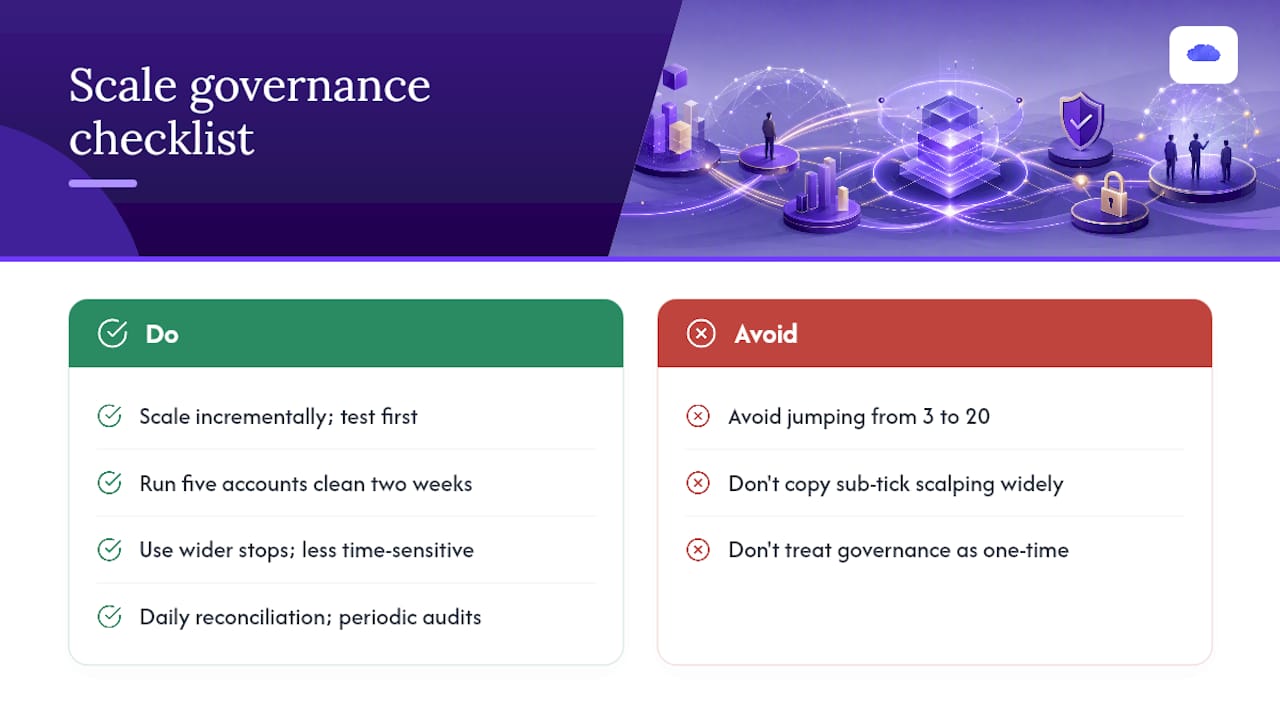
One pattern worth avoiding: copying sub-tick scalping strategies across many accounts. The latency and fill variance that's tolerable at one contract compounds badly once ten followers are all racing for the same fill. Strategies with wider stops and less time sensitivity mirror far more cleanly.
Treat governance as ongoing, not a one-time setup task. Daily reconciliation, a clear escalation path when something desyncs, and periodic audits of your replica logs are what separate a desk running twenty accounts smoothly from one perpetually firefighting.
> — Andres
Where TradeDupe Fits Into Your Linking Workflow
TradeDupe is the direct alternative to stitching together your own webhook chain for this exact job. It connects each Tradovate account, including accounts across Apex, Tradeify, Lucid Trading, and Alpha Futures, through server-side execution with a median latency of 34ms, so the broadcast versus sequential dispatch tradeoff discussed above is handled for you rather than something you have to engineer yourself.

The platform offers per-account controls such as rogue-trade detection, auto-recovery, toggle switches, and an emergency brake feature to manage positions across accounts. Its dashboard provides real-time leader and follower sync status to assist with daily reconciliation. Subscription plans accommodate various user needs, including options for larger groups. If you're ready to move past manual webhook chains, get started with TradeDupe and connect your first leader and follower accounts in about ten minutes.
Sources
- How to Run Multiple Prop Firm Accounts With One Pine Script — Copy Trading Setup Guide
- Managing Multiple Funded Accounts: The Portfolio Approach to Prop Firm Trading - NexusFi Academy